In the Google Earth
™
map, the map is represented based on the images down-
loaded from the Internet.
›
To display, tap the function surface
F
» page 195, Options for map display,
The map and symbol display in the Google Earth
™
map is dependent on the
provider, American company Google, Inc.
To display the Google Earth
™
map, the following conditions are required.
The Infotainment Online online services are activated » page 11.
Internet connection » page 18.
The signal from the data service provider network for the data connection
is available.
Note
■
In the Google Earth
™
Display is possible no insertion of the symbols of the
POI categories.
■
When driving through a tunnel changes the 3D representation of the Google
Earth
™
Card automatically in the 2D display.
■
The speed of the Google Earth
™
display depends on the Internet connection
speed.
Search for destination and enter
Search POI destination /
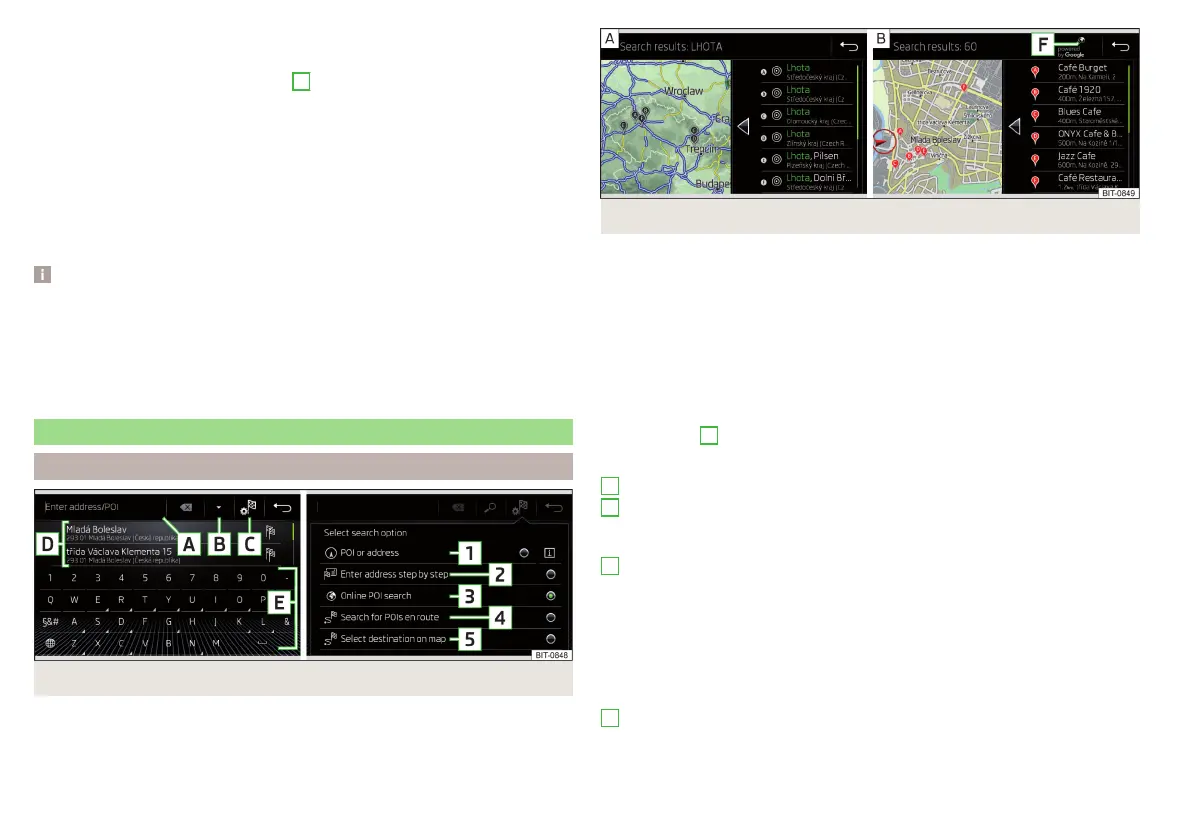
Fig. 228 Destination search: Main menu/Search mode selection
Fig. 229 List of destinations found: in the navigation data/online
The feature allows a full text search of locations or points of interest (POI) by
entering keywords.
Display main menu
›
Route guidance is disabled - From the navigation main menu, tap on the
functional surface
.
›
Route guidance is enabled - From the main Navigation menu, tap the func-
tion surface
→
Name destination
.
›
If no menu for destination search is displayed, but one for destination input
via the address or the destination entry in the map, then tap on the functional
surface
→
1
» Fig. 228.
Description of the functional surfaces » Fig. 228 or » Fig. 229
Input line
Depending on the search mode, the following symbols are displayed
- Display of destinations found in the navigation database
- Display of destinations found online
- Choice of search
1 - Search for destination or POI, by name
2 - Destination input by address » page 189
3 - Online POI search
4 - Search for POI along the route (only works with active guidance)
5 - Enter destination in the map or using GPS coordinates » page 190
- Search for a destination near the entered destination (after selection in
destination details » page 198)
List of last destinations (no character is entered) / List of visited destina-
tions
A
B
C
D
188
Infotainment














 To Next Page