7
3.3 Basix flying
1. Fully charge the baery before flying.
2. Put the drone on a flat and open ground with the user facing the tail of the drone
(the baery tail plug is the tail of the drone).
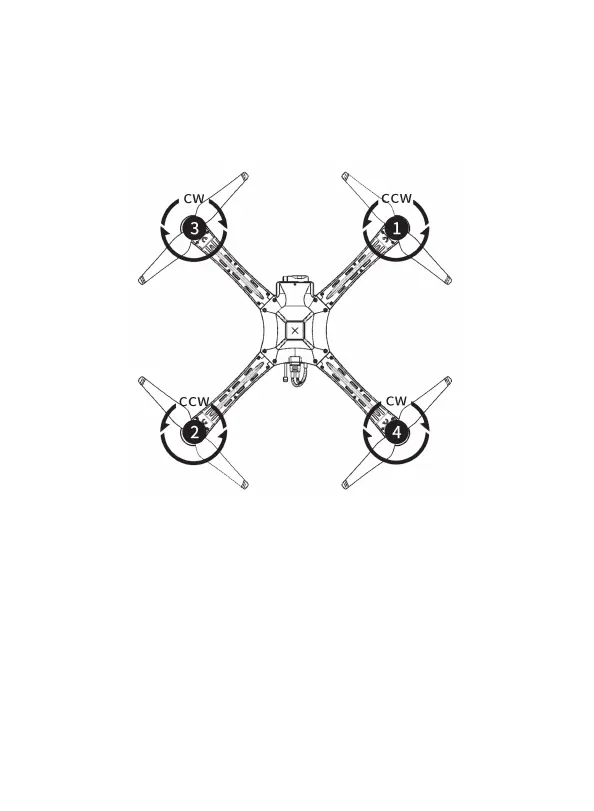
3. Install the propeller correctly.
4. Turn on the remote control (long press the power buon), and insert the baery
plug into the power supply port of the drone.
5. Wait for the drone motor to make a long beep before the self-check succeeds.
6. Open the Skydroid Ground Station APP and click on the connection icon to
connect to the video/image transmission. The GPS mode is recommended for
take-o. It will search for satellites automatically, when the numbers of satellites
more than 12 pieces, it can unlock and take-o.
7. Move the joystick upside-down “V” mode to unlock the drone, and slowly push
the throle joystick upward to let the drone take o smoothly.
8. Pull down the throle stick to land the drone.
9. After landing, pull the throle stick to the lowest position and hold it for more
than 3 seconds until the motor stops.
10. Plug out the drone baery from the drone tail and the power of the remote
controller in turn after stopping.
7


 To Next Page