Page 86 December 2007
SJRT Compact Series
Engine Powered
1
No. Label Pictorial Description
1
TM
TM
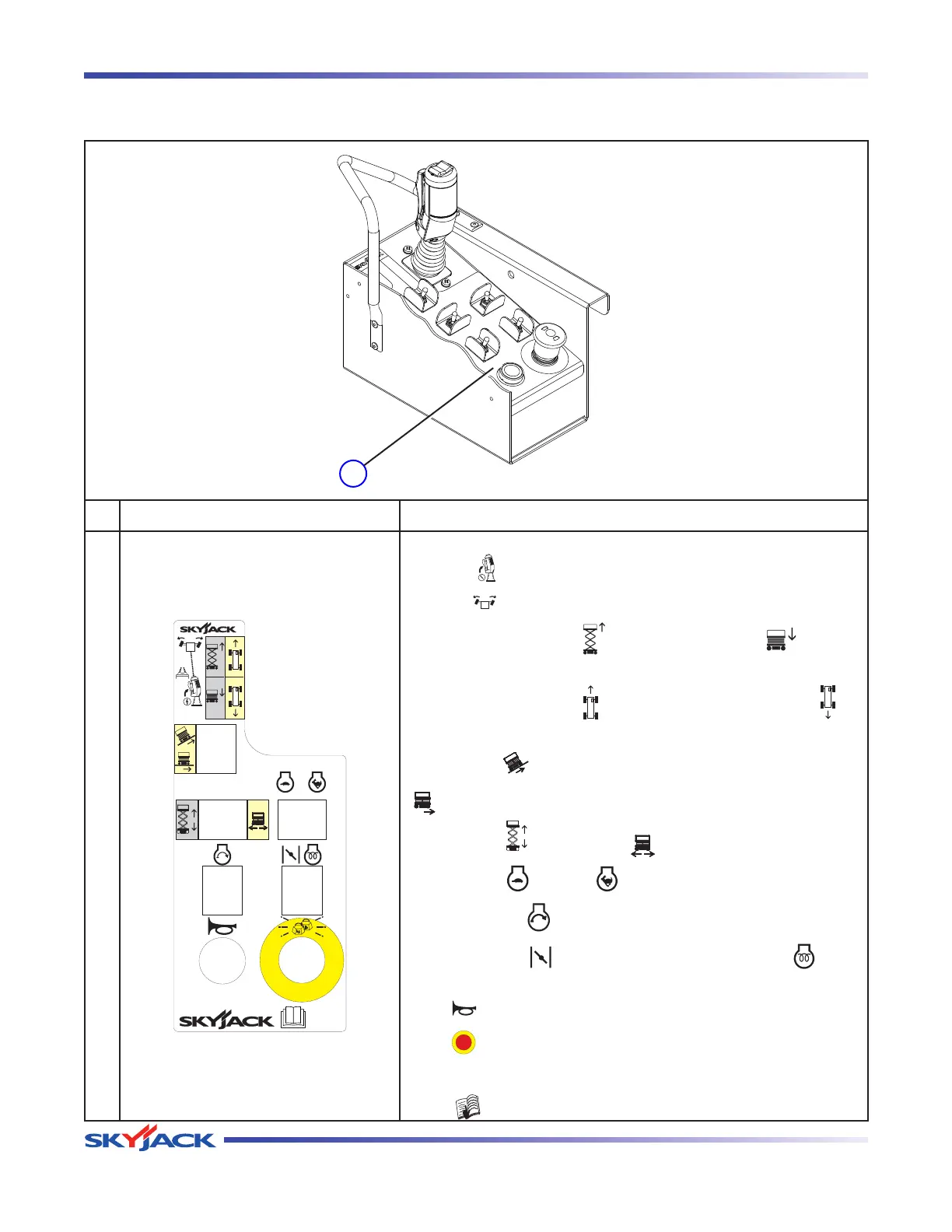
Platform Control Console
Squeeze “ ” trigger to enable controller.
Operate “ ” rocker switch to steer.
Move controller forward “
” to raise or backward “ ” to lower
platform.
Move controller forward “
” to drive forward or backward “ ” to
drive reverse.
Select either “
” drive mode with low speed (high torque) or
“
” drive mode with high speed (low torque).
Select either “
” lift mode or “ ” drive mode.
Select either “
” low or “ ” high engine throttle speed.
Select and hold “
” to start engine.
Select and hold “
” to operate choke (dual fuel) or “ ” glow
plugs (diesel).
Push “
” to sound horn.
Push “
” to stop engine and disable controls (Emergency Stop).
Light indicates controls enabled.
Read “
” operating manual.
Labels and Nameplates - Models 6826 & 6832
Platform Control Console
(Toggle Switch)




 To Next Page