15
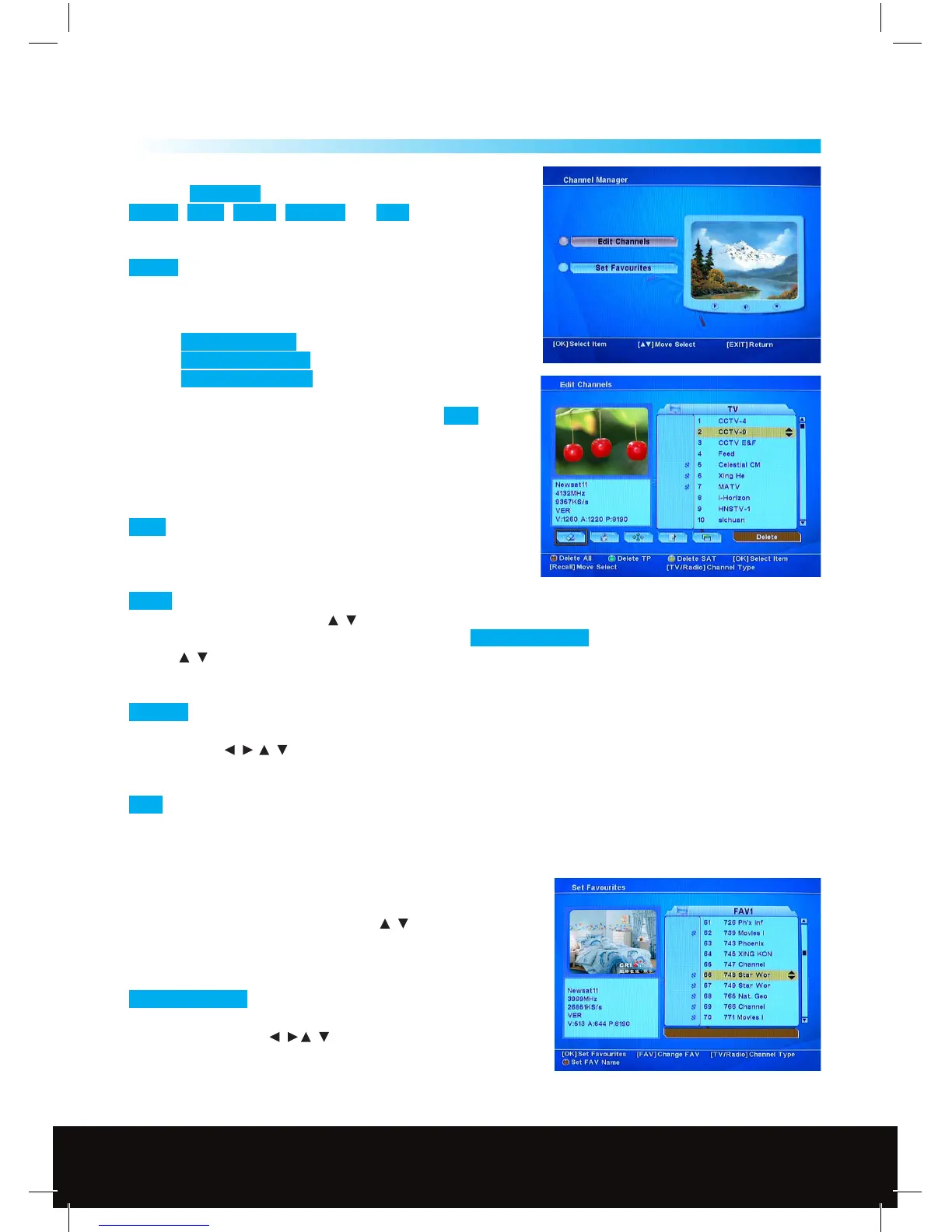
Channel Manager
6.1 Edit Channels
Press the Recall Key (RCL) to choose
Delete , Lock , Move , Rename and Sort functions.
To manage the existing channels.
Delete To delete selected channels from channel list.
Press OK to select a channel for deletion, press OK again to
deselect. An X symbol will appear in front of selected channel
names which are selected for deletion.
Use the Red function Key to delete all channels.
Use the Green function Key to delete unwanted transponder.
Use the Yellow function Key to delete whole satellite.
If you want to delete the selected channels press EXIT ,
a message will appear - “Do you want to delete” - choose Yes or
No to execute or cancel the deletion.
Note: The deleted channels cannot be recovered unless you
search again
Lock Lock the channel to be accessed by password.
The parental Lock must be set up in advance before using
this function.
Move You can move channels to a better or more logical place in the channel list. Select the channel(s)
you wish to move by using the / Keys and then the OK Key if you wish to move a block of channels then
repeat this step for all of the channels, then press the Red Function Key to conrm the selection,
use the / Keys to move your selection to the required place in the channel list and then press the OK Key
to conrm.
Rename Choose the channel you want to rename some channels are listed as TV Ch in the channel list
these can be renamed to make identication easier. Press the OK Key, a Keyboard will be displayed on the
screen use the / / Keys to edit the channel name when you have nished move the cursor to the OK
Icon and then press the OK Key.
Sort You can sort the channels by Alphabet, Satellite, FTA/CAS Channels or Favorite channels.
Press TV/Radio Key to change between TV and Radio channels. Radio channel management is the same
operation as TV channels.
6.2 Set Favourite
Press the FAV Key to select the Favourite list you wish add the
channel to, select the channel with the
/ Keys and then press
OK, a
♥ (Heart Symbol) will be displayed on the left hand side of
the selected channel, repeat for any other favourite channels,
when you have nished press the EXIT Key to save.
Red Function Key To change the name of a Favourites channel
group, press the red function Key, a Keyboard will be displayed
on the screen use the / / Keys to edit the Favourites name
when you have nished move the cursor to the OK Icon and then
press the OK Key.
6



 To Next Page