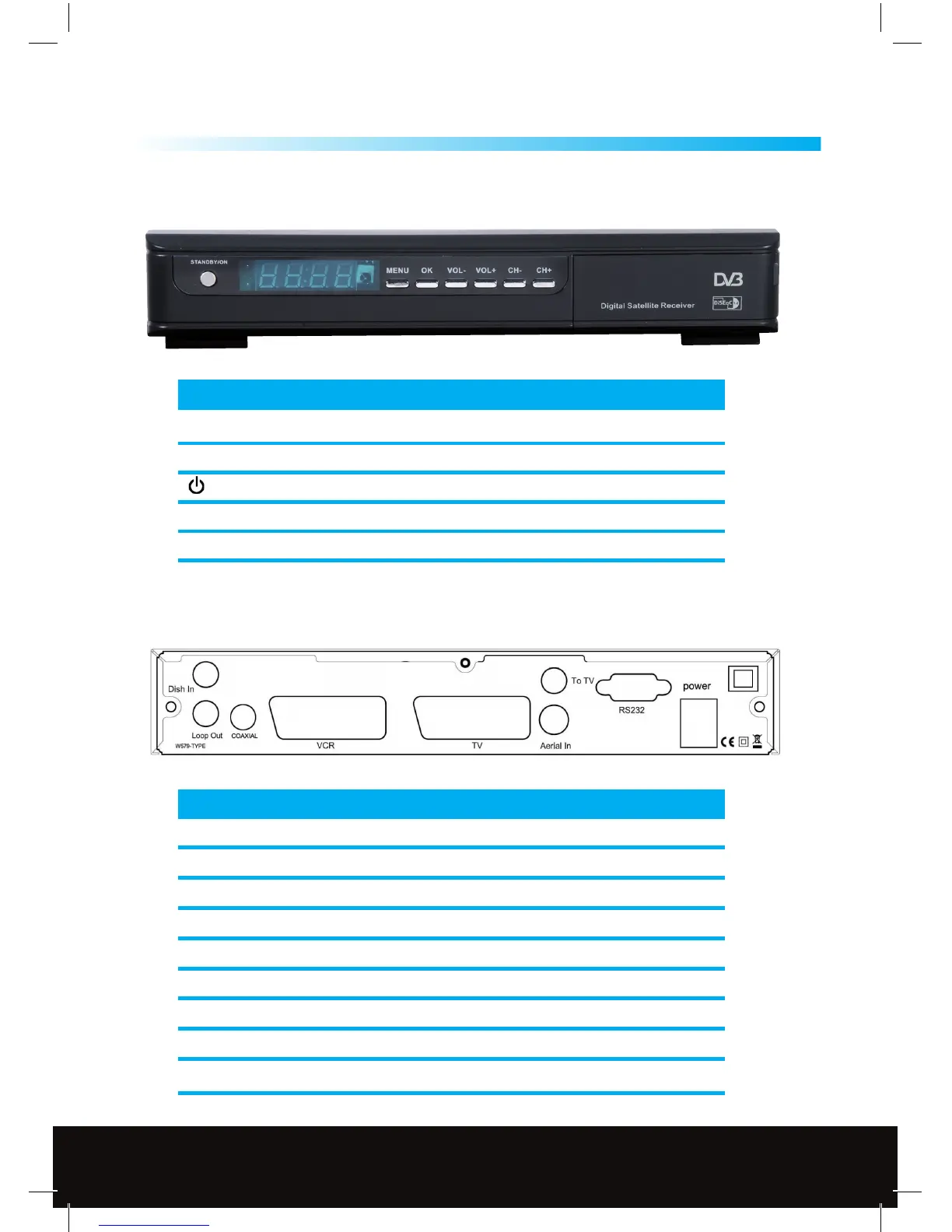
1.4 Front Panel
General Information
6
1
KEY FUNCTION
MENU Show the main menu and back to previous menu
OK Conrm the selection, or jump back to last menu
Power on/o the receiver
CH+/- Channel change(up/down)
VOL+/- Volume control(left/right)
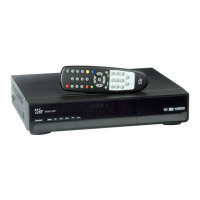
CONNECTION FUNCTION
DISH IN Connect to satellite antenna cable
LOOP OUT
RF loop through output to another receiver
RS-232
Connects to PC for software updates
COAXIAL
Phono socket digital stereo output to TV or HiFi audio
VCR SCART Connect to recording device (VCR/DVD) using SCART cable
TV SCART Connect to TV using SCART cable
AERIAL IN Signal input from local CATV network or outdoor TV antenna
TO TV UHF RF output to TV set’s antenna in
POWER ON/OFF Power on/o the receiver
1.5 Back Panel
Customer Careline: 0901 293 0038
Calls are charged at £1 per minute from a BT landline.
Call charges from other networks may vary
Technical Support: http://technical.philex.com



 To Next Page