9
Receiver Installation - Menu
2-3
3. Menu Information
After completing all your connections switch on the receiver,
the main menu will be displayed, which consists of the
4 menu items listed below.
• Channel Manager
• Installation
• Preferences
• Game
During installation the OK Keys conrms a selection and the
/ Keys shows the menu options. You can also use the
numeric Keys on the RCU to select a channel while watching TV.
Use the / Keys to move up or down from one line to another line. Use the / Keys to move the cursor
up or down in the sub-menu. To quit the menu system at anytime, press the EXIT Key on the RCU.
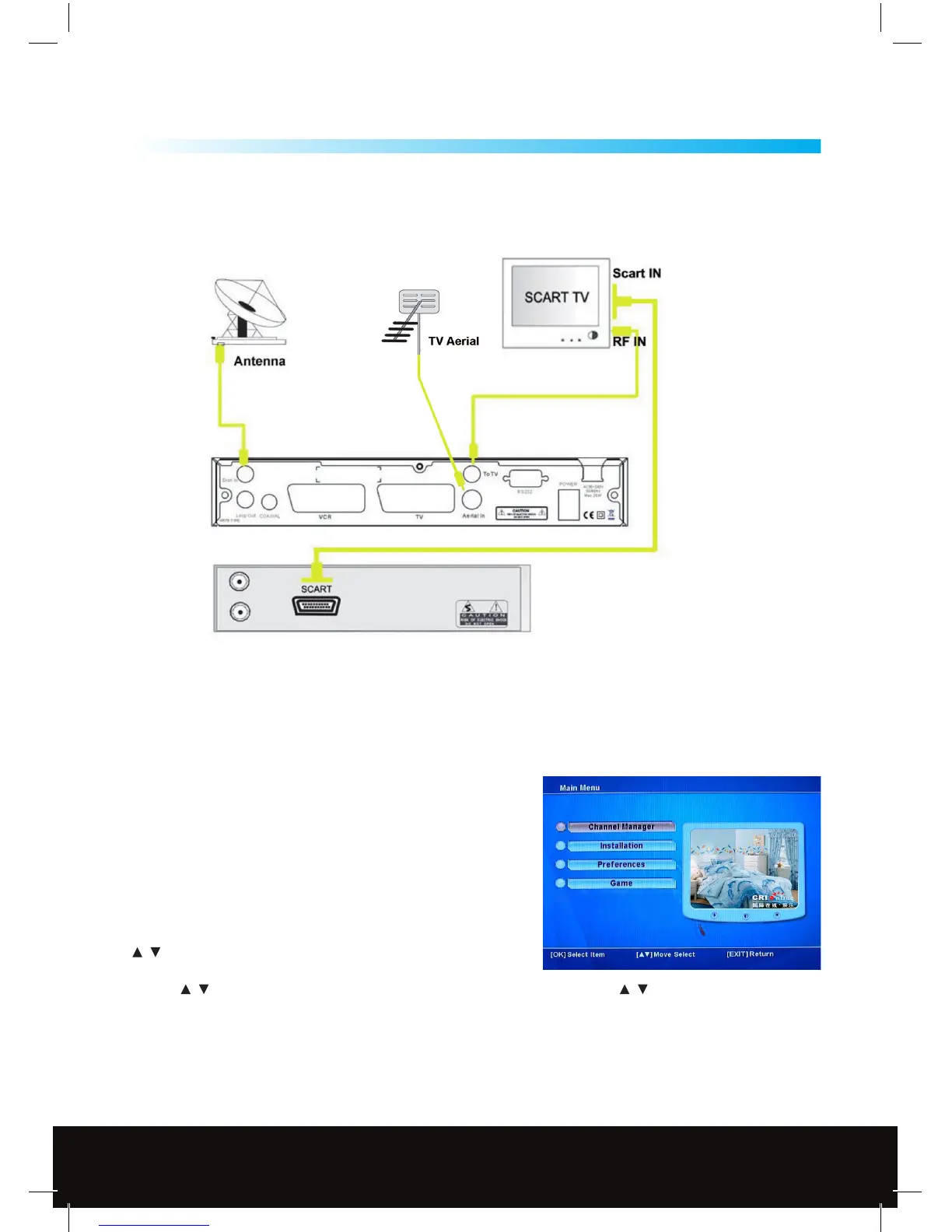
2.3 Connecting to TV using RF support
Customer Careline: 0901 293 0038
Calls are charged at £1 per minute from a BT landline.
Call charges from other networks may vary
Technical Support: http://technical.philex.com



 To Next Page