MAIN
MAIN
MAIN
MAINMenu
M enu
Menu
Menu
Therearethreemethodstoaccess
theMAIN
MAIN
MAIN
MAINmenu.
·PresstheMENU
M ENU
MENU
MENUbuttononthe
frontpanel.
·PresstheMENU
MENU
MENU
MENUbuttononthe
remotecontrol.
·
TouchtheA
A
A
Aarea
a rea
area
areaonthetouch-
screen.
Note:Remote,Smartdial,touch
screenoperationsandbuttonson
frontpanelarealluseabletoselect
menuandadjustsettings.The
followinginstructionswillshowthe
differentwaystoaccessmenus
andadjustments.
Rear
Rear
Rear
Rearzone
z one
zone
zoneMenu
M enu
Menu
Menu
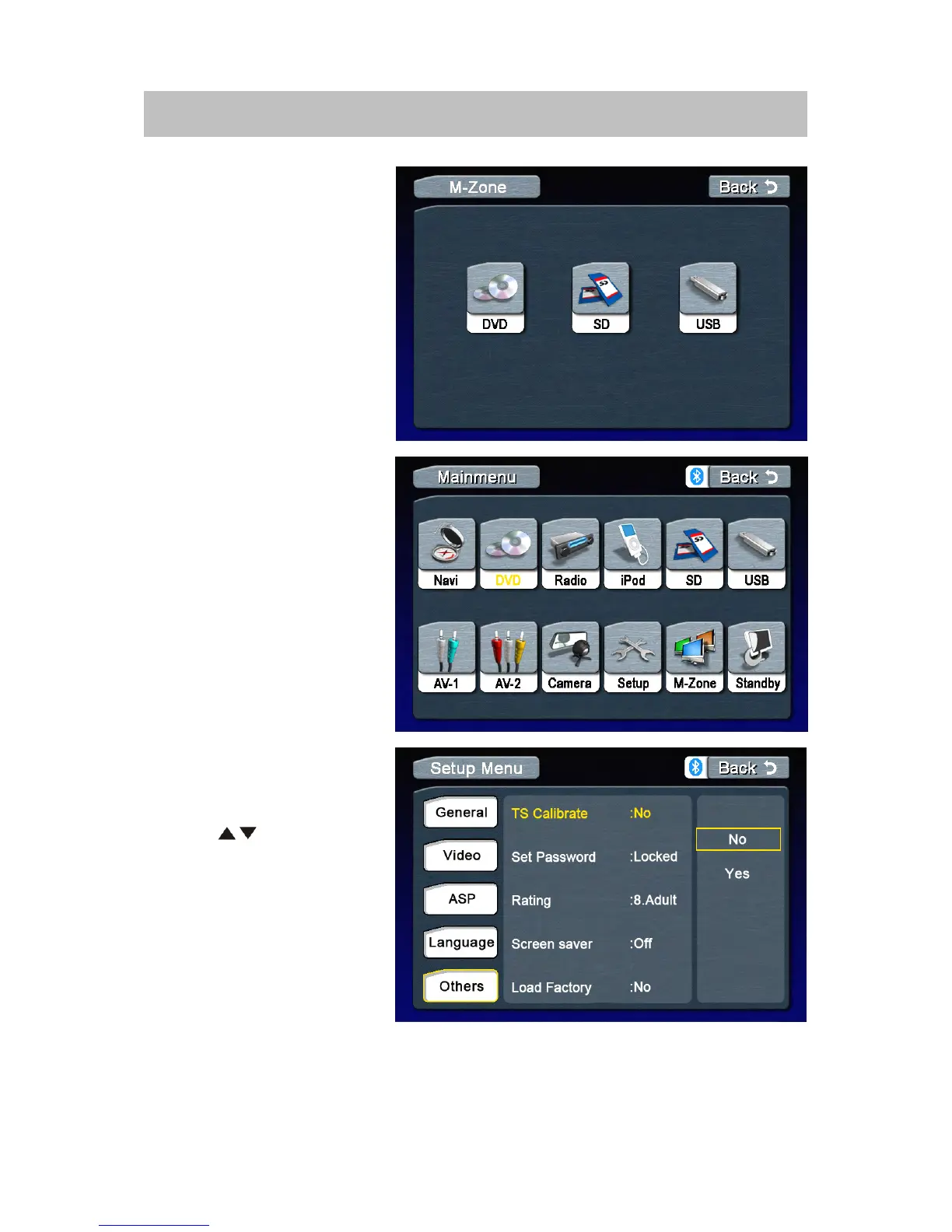
PressM-zoneicontoenterrear
zonemenu
Note:
Note:
Note:
Note:Only
O nly
Only
Onlythe
t he
the
thefront
f ront
front
frontzone
z one
zone
zoneis
i s
is
isin
i n
in
in
DVD
DVD
DVD
DVDmode,then
m ode,then
mode,then
mode,thenRear
R ear
Rear
Rearzone
z one
zone
zoneDVD
D VD
DVD
DVD
can
can
can
canbe
b e
be
beactivated.Rear
a ctivated.Rear
activated.Rear
activated.RearUSB
U SB
USB
USBand
a nd
and
and
SD
SD
SD
SDis
i s
is
isthe
t he
the
thesame.
s ame.
same.
same.
Screen
Screen
Screen
ScreenSetting
S etting
Setting
Setting
Accessing
Accessing
Accessing
Accessingthe
t he
the
theScreen
S creen
Screen
ScreenSetup
S etup
Setup
Setup
Menu
Menu
Menu
Menu
PresstheSetup
S etup
Setup
Setuponthe
screen.
Selectthe"Other"Icononthe
screentoaccesstheScreen
setup.
Selecting
Selecting
Selecting
Selectinga
a
a
aFeature
F eature
Feature
Featurefor
f or
for
for
Adjustment
Adjustment
Adjustment
Adjustment
Pressthe(/)buttonsonthe
remotetoselectafeaturetobe
adjusted.
RotateSMART
S MART
SMART
SMARTDIAL
D IAL
DIAL
DIAL
clockwise/anticlockwisetoselecta
featuretobeadjusted.
Touchdirectlytheoptionsonthe
screentoselectafeature
tobeadjusted.



 To Next Page