EasyManua.ls Logo

Skypine IM-8213B - Remote Remote Control Control; Front Zone Remote Control

Default Icon
42 pages
Print Icon
To Next Page IconTo Next Page
To Previous Page IconTo Previous Page
Loading...
8
F
F
F
Front
r ont
ront
rontZone
Z one
Zone
ZoneRemote
R emote
Remote
RemoteControl
C ontrol
Control
Control
Name
Name
Name
Name
Ref
Ref
Ref
Ref#
#
#
#
Signal
Signal
Signal
Signal
Function
Function
Function
Function
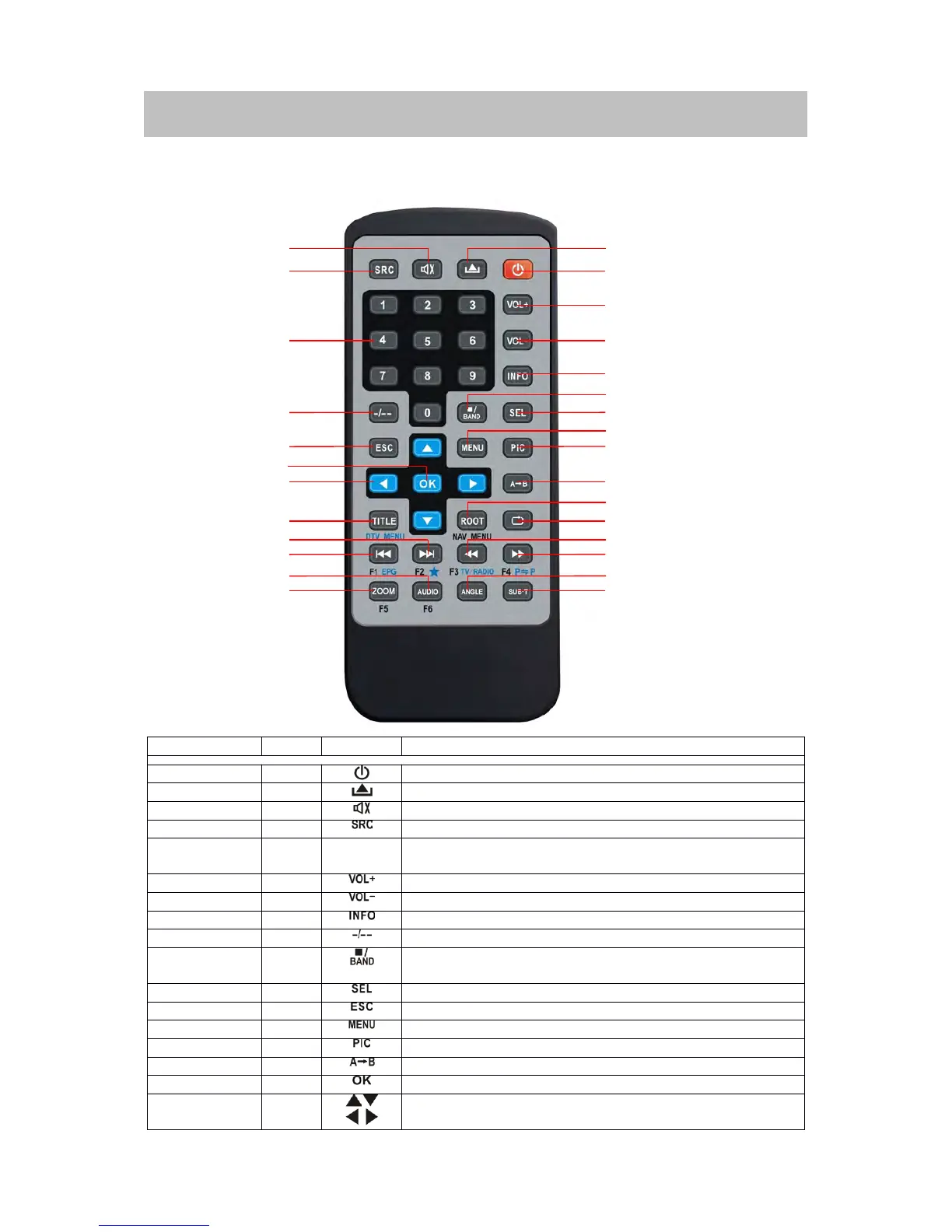
Power
1
Turnthepoweron/off
Open
2
discinsertion/ejection.
Mute
3
Toggleon/offaudiooutput
SRC
4
Selectplayingmode
Numeric
button
5
1.2.3.4.5.
6.7.8.9.0
Directlyaccesscertainchapter/track/presetstationin
currentband
VOLup
6
Increasethevolume
VOLdown
7
Decreasethevolume
Information
8
Displayplayinginformation
GOTOsearch
9
PositionsearchfunctiononVCD/DVDmode
Stop/Band
10
SelectFM/AMbandonTunermode
Stopplayback
Select
11
Entertheaudiosettings
ESC
12
Exitthecurrentmenu
Menu
13
Enterthemainmenuofsystem
Picture
14
AdjusttheparameterofTFTsettings
RepeatAB
15
SetstartpointAandendpointBtorepeatcontinually
OK
16
Startorpauseplayback,confirmthesettings
Direction
buttons
17
Up/down/left/righttoselectitemsforsetting
1
2
6
7
8
10
11
13
14
15
19
20
23
24
27
28
9
3
4
5
12
16
18
21
22
25
26
17