OPERATING PROGRAM
R : 3 S E R S: 3 S E R
C O N F I RM ( E N T E R )
L P 4 s 1 . 5A 1 2 . 1 4 V
B A L 0 0 0 :5 0 0 0 0 2 2
7. Charging Status Monitor
R shows the number of cells detected by the charger and S is the
number of cells set by you at the previous screen. If both numbers
are identical, press START/ENTER to start charging process.
During charge process, real-time status will be showed as left screen.
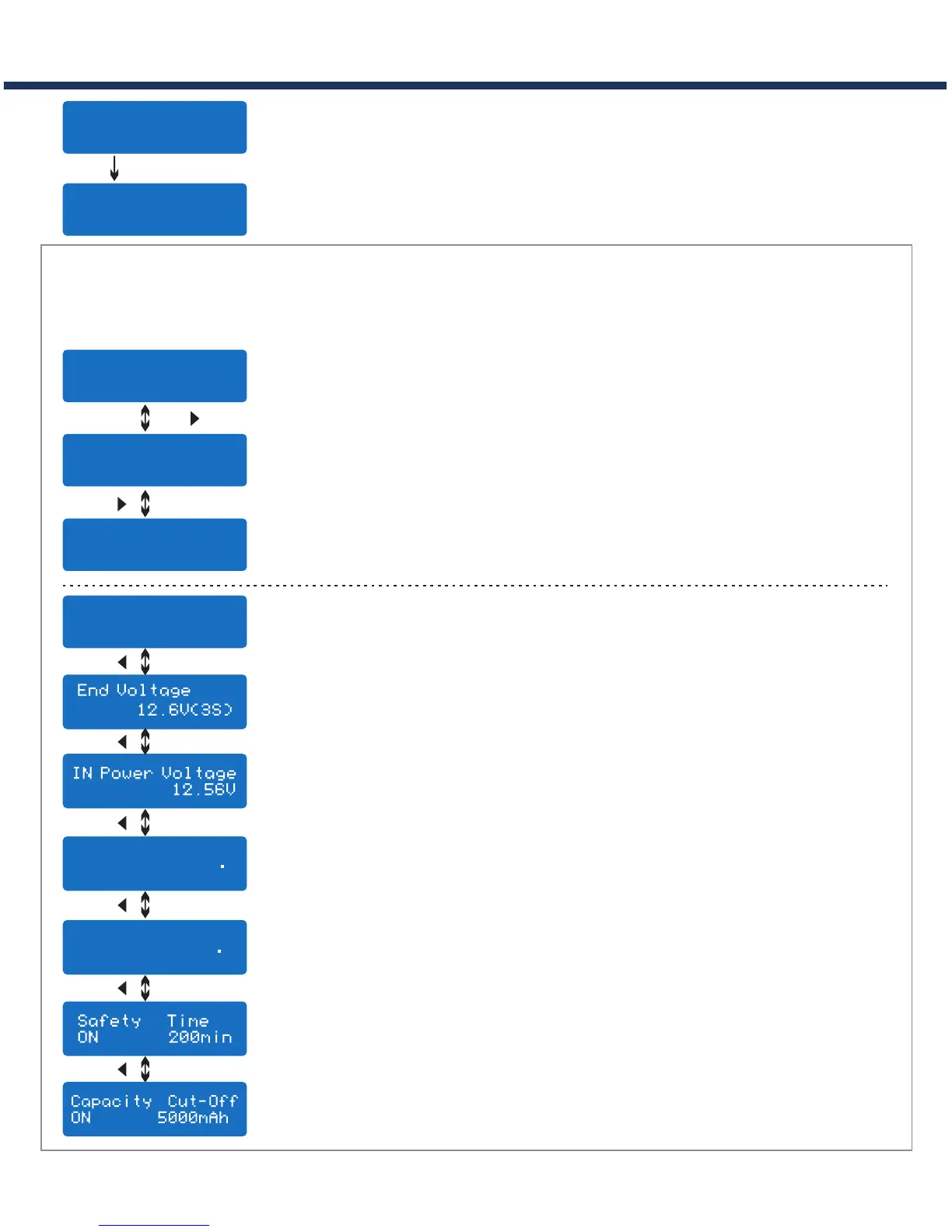
VARIOUS INFORMATION DURING THE PROCESS
Press INC or DEC during charging or discharging process, you can inquire various
information on LCD screen .
L P 4 s 1 . 5A 1 2 . 1 4 V
B A L 0 0 0 :5 0 0 0 0 2 2
4 . 0 7 4 . 06 4 . 1 1 V
0 . 0 0 0 . 00 0 . 0 0 V
F u e l = 9 0%
C e l l = 4 .1 0 V
INC
INC
L P 4 s 1 . 5A 1 2 . 1 4 V
B A L 0 0 0 :5 0 0 0 0 2 2
Ext. Temp ----
Int. Temp 37 C
DEC
Temp Cut-Off
50 C
DEC
Final voltage when the program ends.
Input voltage.
Safety timer ON and duration of time in minutes.
Capacity cut-off ON and the setting value of capacity.
Voltage of each cell in the battery pack when the battery is
connected with balance lead.
Internal temperature.
Temperature probe is needed to show external temperature.
Charged capacity percentage and average cell voltage of the
battery pack.
Real-time status: battery type, battery cell, charge current, battery
voltage, elapsed time and charged capacity
Cut off temperature
START/ENTER
DEC
DEC
DEC
DEC
· 14
D200



 To Next Page