SOLDERING IRON
· 22
D200
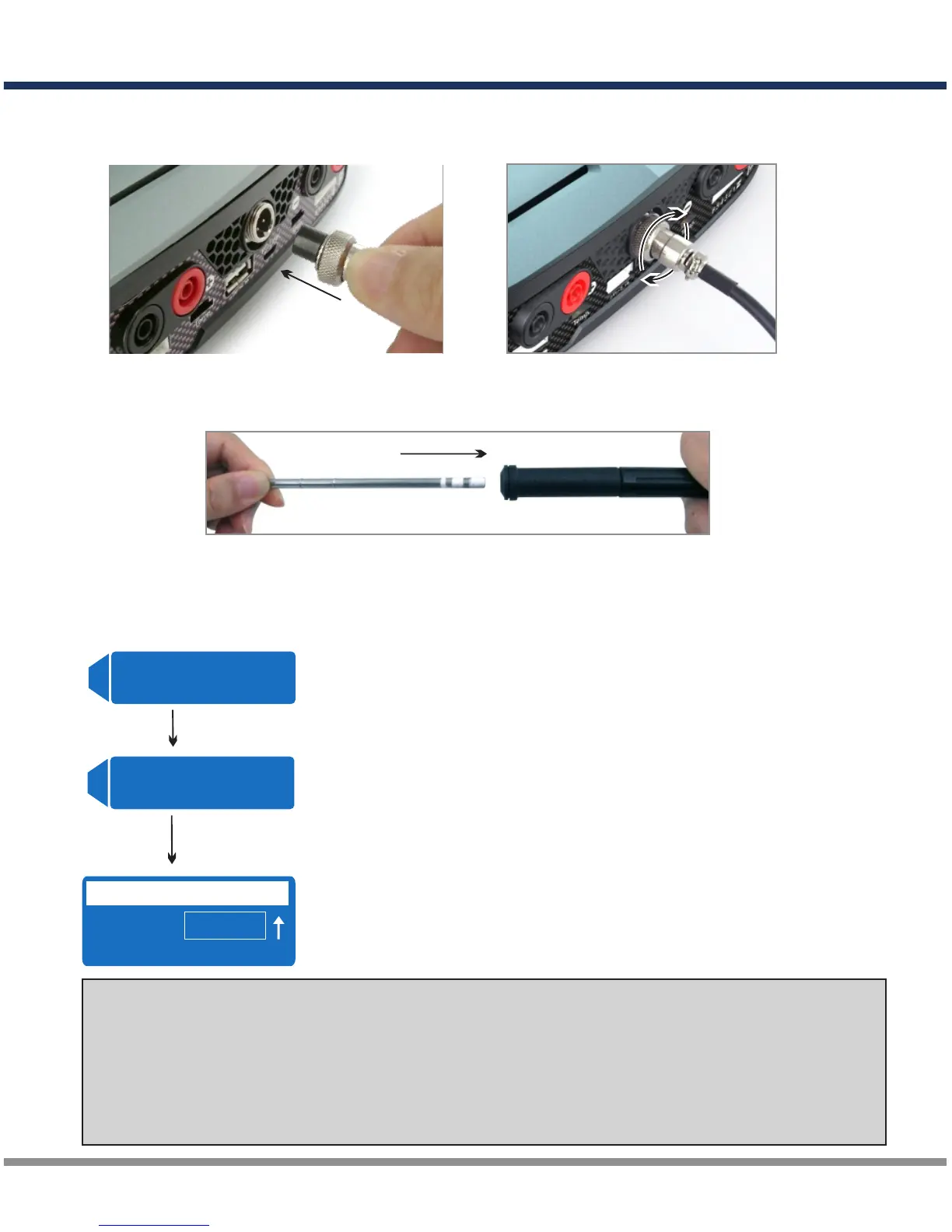
1) Connect the soldering iron cord to the receptacle securely.
1. Setup and Connection
2) Choose desired soldering tip and install it
3) Saturate cleaning sponge with water and place it into the stand,
4) Put the iron on the stand and do not touch any metallic parts while operating.
Insert
Rotating clock-wise
2. Operation and Setting Temperature
CAUTION: When the soldering station in operation, the tip temperature is
between 200°C-450°C(392°F-842°F).
Any mishandling may lead to burns or fire. Do not use the soldering iron near
flammable items such as Nitro Gas, LiPo Battery, and etc.
For safety reason, DO NOT charge battery and soldering items at same time.
B A T T / PR O G R A M
L i P o B A T T
Power on the charger, select channel A,
and press DEC or INC button.
A
B A T T / PR O G R A M
E L E C T R I C I R O N
Press the START/ENTER to enter the
electric iron program.
START
ENTER
Soldering Iron
350℃ 260℃
SET REAL
Press INC or DEC button to set the desired temperature.
And the temperature will adjust automatically.
The screen indicates the set and real temperature.
Press STOP/PROG button to stop this function.
INC/DEC
A



 To Next Page