INTRODUCTION
· 02
D200
Please read this entire operating manual completely and attentively
before using this product, as it covers a wide range of information on
operating and safety. Or please do use this product in company with a
specialist!
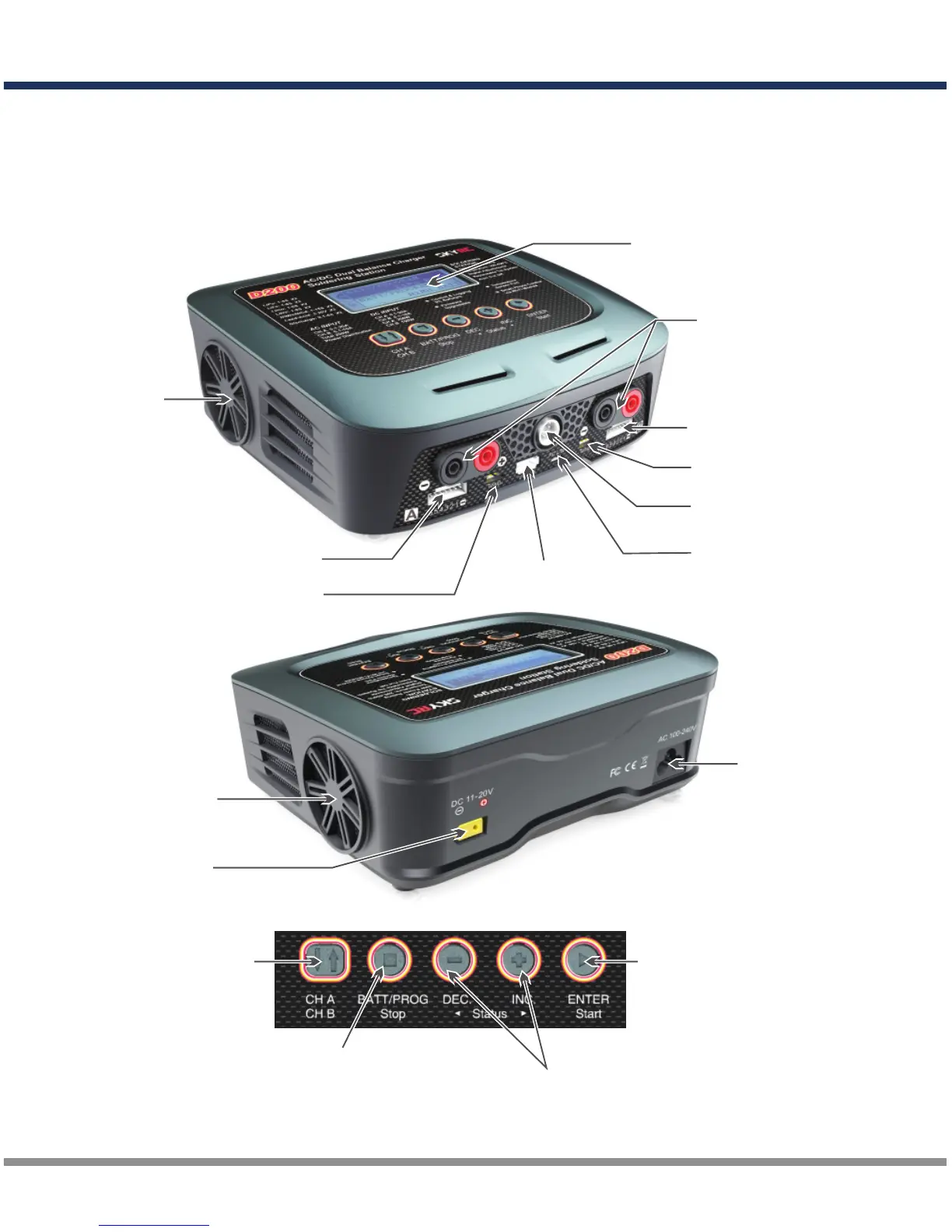
LCD Display
Output Socket
4mm Banana Plug
Balance Lead Socket
Cooling Fan
Balance Lead Socket
USB Port
Micro USB Port for
PC Link / WiFi Module
Connection
Temperature Sensor Port
Soldering Iron
Cord Receptacle
AC Input
100-240V
Cooling Fan
DC Input
11-20V
Resume or Start Charge
Processes
Alter Values
See the Status of Individual
Cells in Balance Charge Mode
Scroll Through the Main Menu
Stop Any Charge Processes
Switch from
Channel A to B or
Channel B to A
Temperature Sensor Port



 To Next Page