Ultimate 200W×2
DISCHARGE OF NICD/NIMH BATTERY
Discharge of NiCd/NiMH battery
Discharge
current
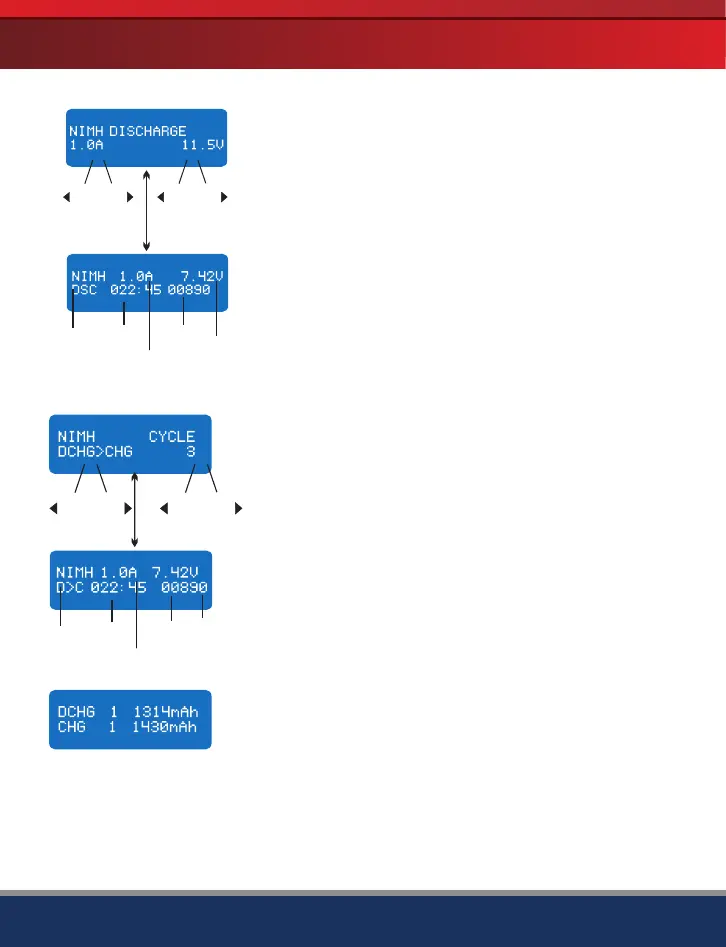
The screen indicates the discharging state. You can press
Start/Enter key to alter discharge current. Press Start/Enter
again to store the value. Press Batt Type/Stop key to stop
discharging. The emitted sound alerts the end of discharging.
Battery
type
Battery
voltage
Elapsed
time
Discharged
capacity
Batt type
Stop
Start
Enter
DEC
INC
DEC
INC
Set discharge current on the left and the final voltage on the
right. Range of the discharge current is 0.1-5.0A; range of
final voltage is 0.1-25.0V. Press Start/Enter key for more
than 3 seconds to start the program.
Charge/discharge and discharge/charge cycle of NiCd/NiMH battery
You can set up sequence on the left and the number of
cycles on the right. Range of the cycle number is 1-5.
DEC
-
Batt type
Stop
INC
+
DEC
Start
Enter
-
INC
+
Press Batt Type/Stop key to stop program, you can press
Start/Enter key to alter charge current. The sound indicates
the end of program.
Battery
type
Elapsed
time
Battery
voltage
Discharged
or charged
capacity
Discharge
or charge
current
When it approaches to the end, you can see the capacity of
the battery being charged or discharged. You can press Inc
or Dec key to display result of each cycle.
'> 3 seconds '
'> 3 seconds '
· 21
-
+
-
+


 To Next Page