Quick Start Guide
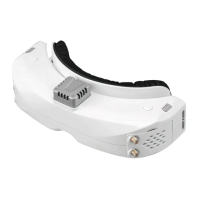
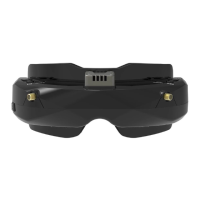
1.Install the receiver and antenna.
2.Plug the battery into battery bay or use power cables to connect battery to the goggle, goggle can
power by 2~6cells lipo battery, hold the power button to turn on.
Band and Chanel setting
1. Press the right wheel, then roll the right wheel to change channel, press the wheel again switch to band
setting mode, then roll the wheel to change the band.
2.No wheel operation for 3 seconds,goggle will quit RF setting mode .
3. Hold the right wheel to pop up search menu, press the right wheel to start auto search, after searching
all the frequency, receiver will work on the strongest signal. roll the right wheel to manually select the
channels, short press the right wheel to quit search.
Sometime the auto search channel is not accurate, user may need manually select the channel.
MODE MENU
·Short press the left wheel to pop up mode menu.
·RF normal: this mode is normal 48 CH receive mode.
·RF Racing: this mode will make receiver only working on RaceBand.
·RF Third-Party: in this mode, the goggles button cant control the external receiver, also the OSD of the
goggles cant read the band/channel of the receiver.
·AVIN: when enable the AV IN mode . The NTSC and PAL system format can be supported to be
automatically switched. The receiver module will be automatically turned off to save the power.
·HDMI IN : the receiver module and the video record module will be automatically turned off to save
the power.
·It is recognized that the screen and the corresponding resolution information will be automatically
displayed in the supported resolution format.
·Playback: in this mode, customer can review the DVR files.
DO NOT EXPOSE THE LENS DIRECT TO SUNLIGHT, OTHERWISE
THE SCREEN WILL BURN IN.
4
PLAYBACK
· In playback mode, roll right wheel to choose the DVR, short press right wheel to play and pause .
· Left wheel to adjust the volume.
· When playing the DVR, roll the right wheel to Fast Forward or Fast backward.
· .Press the Right button to quit DVR
· Press the Left button to delete DVR.
PLAYBACK
· In playback mode, roll right wheel to choose the DVR, short press right wheel to play and pause .
· Left wheel to adjust the volume.
· When playing the DVR, roll the right wheel to Fast Forward or Fast backward.
· .Press the Right button to quit DVR
· Press the Left button to delete DVR.


 To Next Page
 Loading...