Main Parts & Interfaces
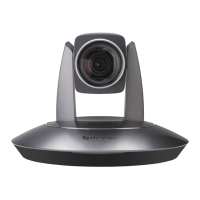
Camera
Front View
1 Camera Module
2 Power Indicator
3 Remote Controller Indicator
Rear View
4 DVI-I interface
5 HD-SDI interface
6 Composite interfaces (CVBS output,
RS485/RS422, RS232 IN and RS232 OUT)
7 DC12V power input
Bottom View
8 DIP Switch
Set camera address, protocol, baud rate,
video format and mounting type.
9 Mounting Hole
1/4”inch screw thread for fixing camera.
10 Locating Hole
To define installation direction of camera.
11 Fixing Screw Hole (M3)
To connect the camera with pendant
mounting bracket.


 To Next Page