Installing the Interactive Whiteboard 25
If you purchased the SMART Board for Flat-Panel Displays interactive whiteboard without the
pen tray, you must install a controller unit. While you lose the convenience of the pen tray and
the pen tray tools with this configuration, you’ll still have access to the many writing features of
SMART Board software.
NOTE: Depending upon where and how the interactive whiteboard is mounted, you may need
to perform some of the following steps by touch due to reduced visibility.
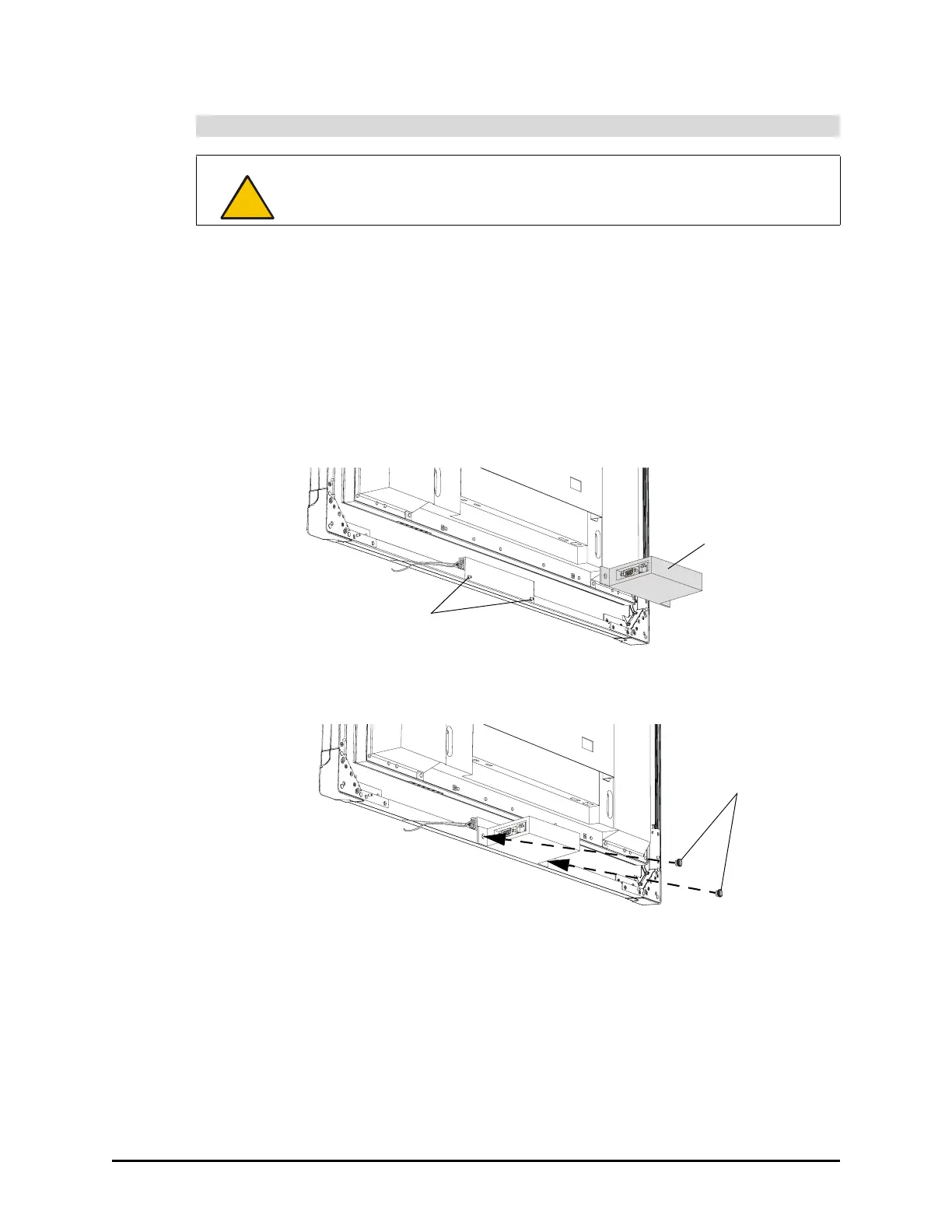
1. Remove the thumbscrews from the back of the overlay. You will need these
thumbscrews for the next step.
2. Slide the holes in the controller over the threaded posts on the overlay.
3. Attach the thumbscrews that you removed in step 1 to the threaded posts to hold the
controller to the overlay.
To attach the controller
CAUTION
Do not connect the interactive whiteboard to the computer until after you’ve
installed SMART Board software. For more information, see page 6.
Threaded
Posts
Controller
Thumbscrews





 To Next Page