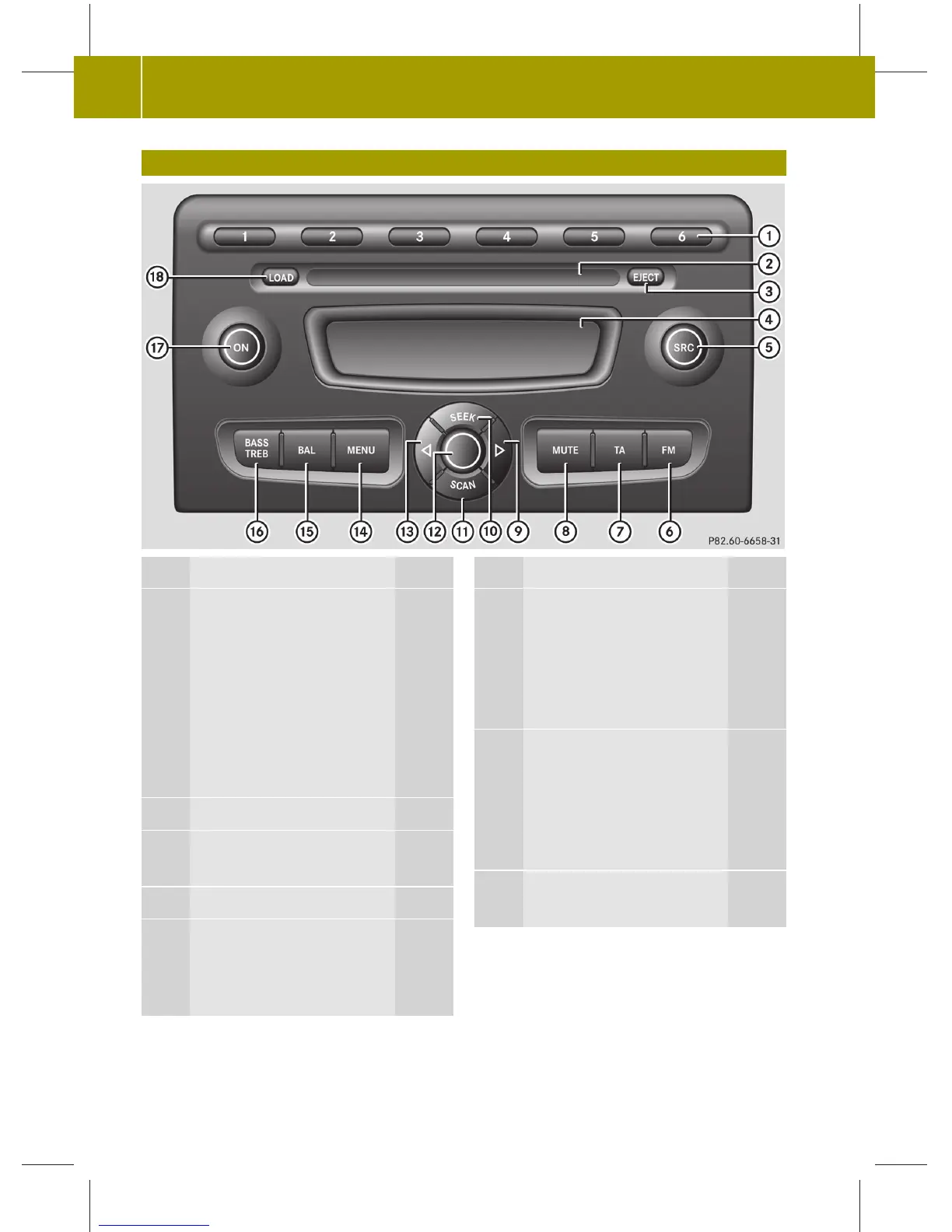
Operating Elements
Function Page
1
Number buttons 1 – 6
In radio mode:
press briefly to select a
pre-set station 13
press and hold to store a
station 13
In CD mode:
select CD 1 – 6 from the CD
changer 18
2
CD slot
3
EJECT button
Ejecting CDs 17
4
Display 7
5
SRC button
Selects an audio source
(radio, CD or AUX)
12,
17,
10
Function Page
6
FM button
Press briefly to select an
FM pre-set group (FM 1 or
FM 2) 12
Press and hold to start the
Autostore function 13
7
AM button
Press briefly to select an
AM pre-set group (AM 1 or
AM 2) 13
Press and hold to start the
Autostore function 13
8
MUTE button
Mutes playback 9
6
>> At a glance.
audio_ZA; 1; 6, de-DE
sabbaeu, Version: 2.11.4
2008-11-10T16:21:39+01:00 - Seite 6



 To Next Page