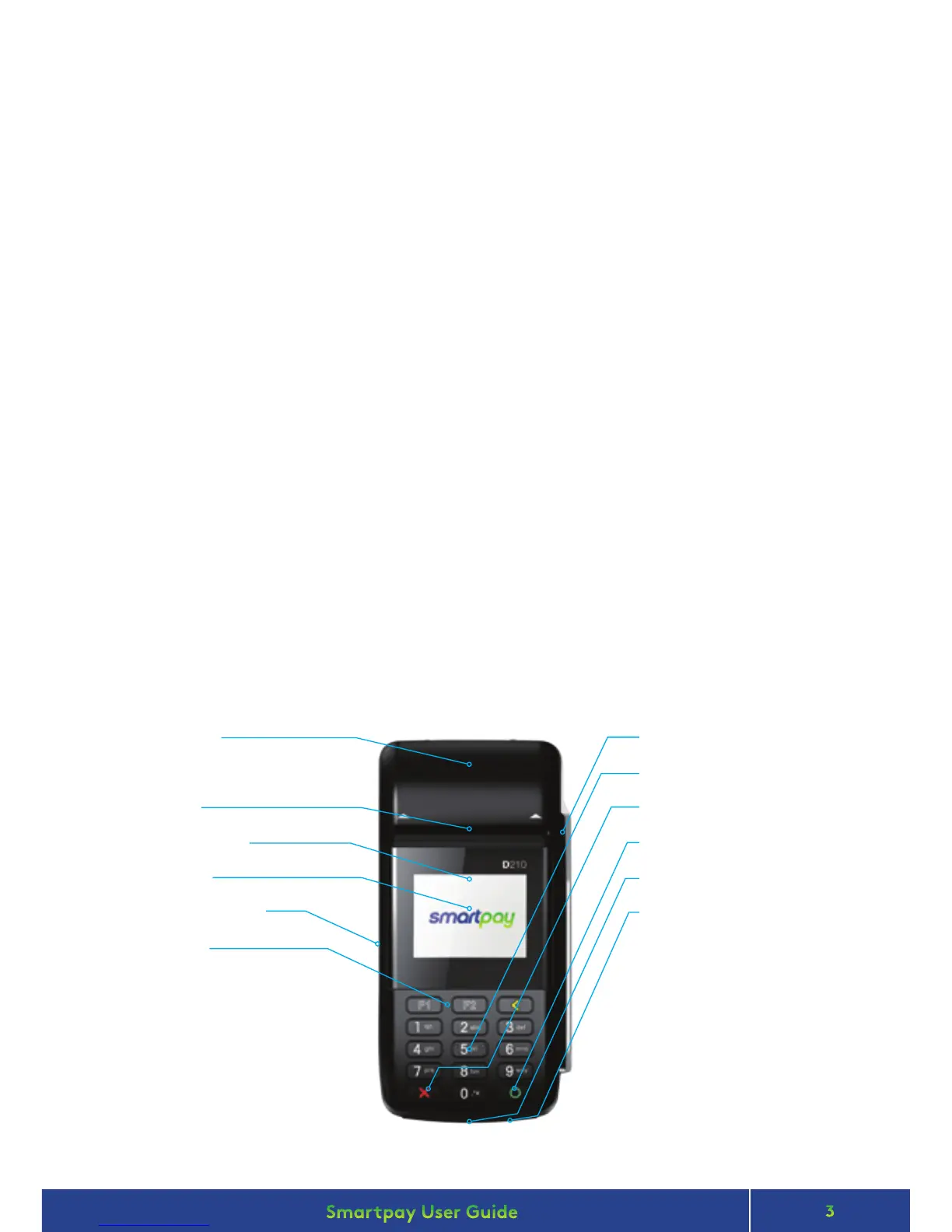
Smartpay Pax D210 EFTPOS provides a smart, secure and robust payment terminal. The D210 connects to
the Internet to process either manual or Smartlink Lite integrated POS transactions via your 2.4GHz Wi-Fi
network connection.
Smartpay Pax D200 EFTPOS provides a small footprint, secure and robust mobile payment terminal. The D200
connects to the Internet to process Smartlink Lite integrated POS transactions via your Wi-Fi connection.
D200 does not have its own receipt printer and cannot be used for manual EFTPOS transactions or MOTO.
• The battery on your D210 will last +/- 8 hours in standard use situations.
• Battery life can be aected by Wi-Fi signal availability and consistency.
• Smartpay recommends charging the unit regularly when not in use.
For EFTPOS terminal enquiries, issues or support contact Smartpay Technical Helpdesk on
0800 476 278 or email customer.service@smartpay.co.nz
TERMINAL HARDWARE
D210
CONTACT
Thermal Printer
(use side indents to lift printer cover
when changing paper rolls)
Paper Cutter
Contactless Reader
Display Screen
Power On/O Button
Function Keys
Mag Swipe Card Reader
Number/Letter Keys
Cancel Key
Enter Key
Chip Card Slot
Power Charging Port


 To Next Page