Installation and Operation
UNPACKING
Inspect the UPS upon receipt. The box should contain the following:
(1) UPS (2) User Manual
OVERVIEW
The SBP Plus provides automatic voltage regulation for inconsistent utility
power, and battery backup during power outages. The SBP Plus ensures
consistent power to your computer system and its included software will
automatically save your open files and shutdown your computer system during a
utility power loss.
HOW TO DETERMINE THE POWER REQUIREMENTS OF YOUR EQUIPMENT
1. Insure that the equipment plugged into the battery power-supplied outlets does
not exceed the UPS unit's rated capacity. If rated unit capacities are exceeded,
an overload condition may occur and cause the UPS unit to shut down or the
circuit breaker to trip.
2. There are many factors that can affect the amount of power that your computer
system will require. For optimal system performance keep the attached load
below 80% of the UPS's rated capacity.
HARDWARE INSTALLATION GUIDE
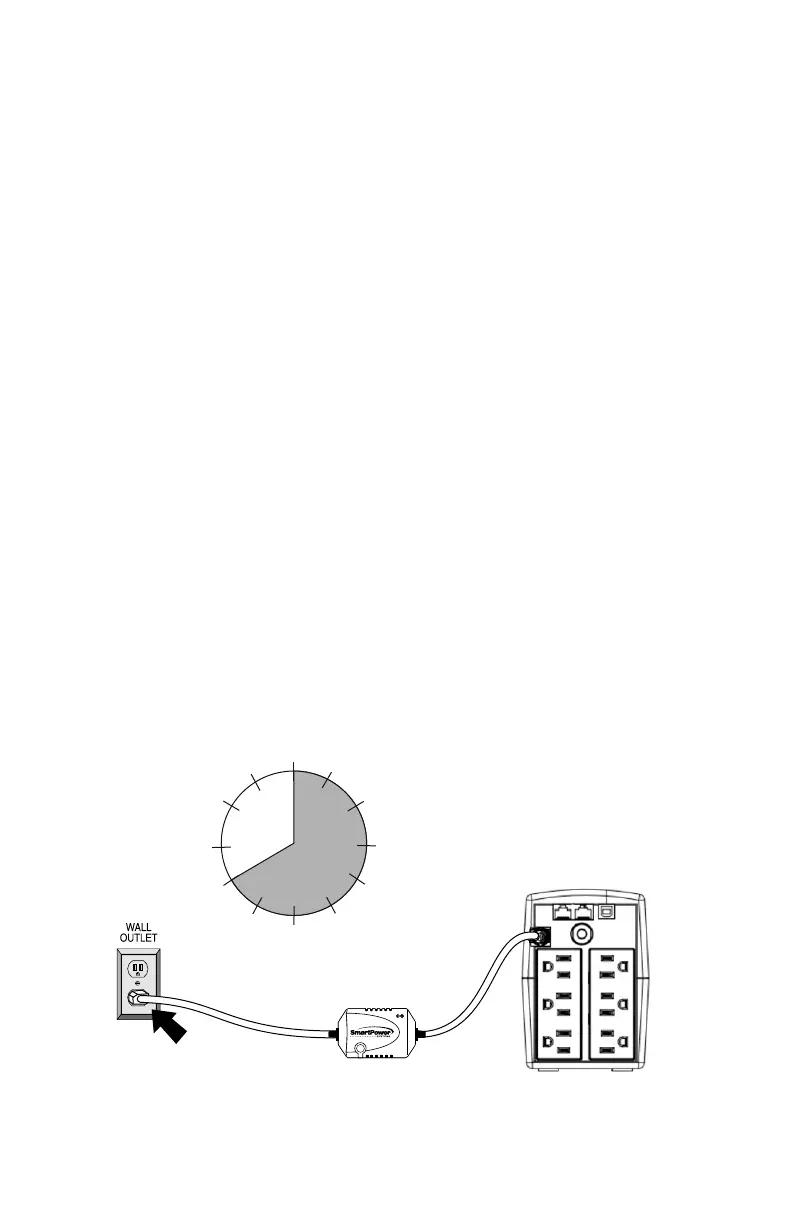
1. Your new UPS may be used immediately upon receipt. However, recharging
the battery for at least 8 hours is recommended to ensure that the battery's
maximum charge capacity is achieved. Charge loss may occur during shipping
and storage. To recharge the battery, plug the UPS into an AC outlet. The unit
will charge in both the on and off position.
4
8 Hours


 To Next Page