6
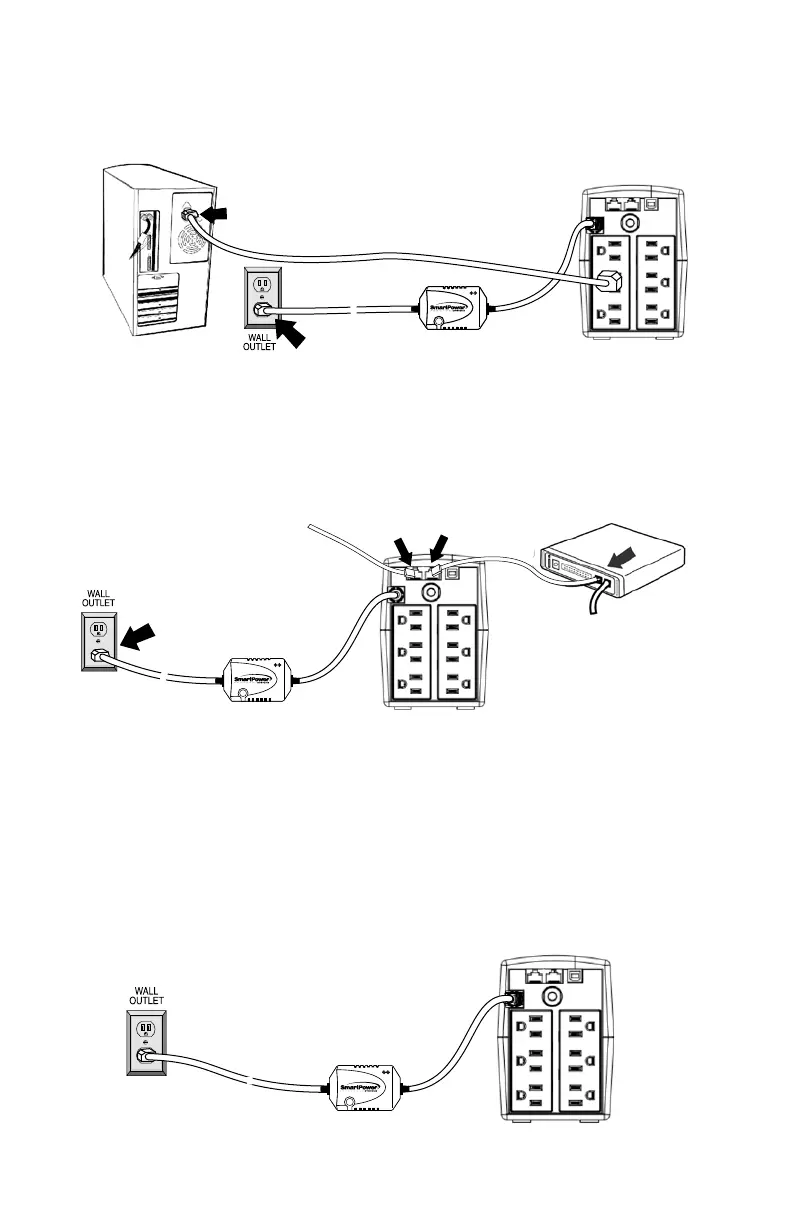
Computer Connection
Connect one computer-related device into each of the power receptacles
supplied on the back of the UPS (maximum of three devices).
Modem/Phone line Connection
Plug incoming internet line into the “In” socket at the back of the UPS.
Use one more Internet line cable and plug one end of the Internet line
cable to the “Out” socket at the back of the UPS. Plug the other end to
the modem input socket as shown.
COMPUTER
UPS TBF™ Models
Uninterruptible
Power Supply
1.Turn off and un-plug all devices.
2.Plug UPS unit into grounded wall outlet.
3.Place the UTBF where monitoring lights can be observed.
UTBF INDICATORS:
Green light only - It confirms properly connected equipment is fully protected.
Green and Red light - Reverse polarity or loss of ground at the wall outlet.
Call your electrician to correct the problem.
Green light off - Power failure or UTBF fault. Contact customer service.
UTBF
Incoming
Internet line
Uninterruptible
Power Supply
UTBF
~
~
Uninterruptible
Power Supply
~


 To Next Page