Page 7
501 SE Columbia Shores Boulevard, Suite 500, Vancouver, Washington 98661, USA l +1 360 859 1780
SmartRG Inc. Propriety and Condential. All Rights Reserved. Copyright © 2014 smartrg.com
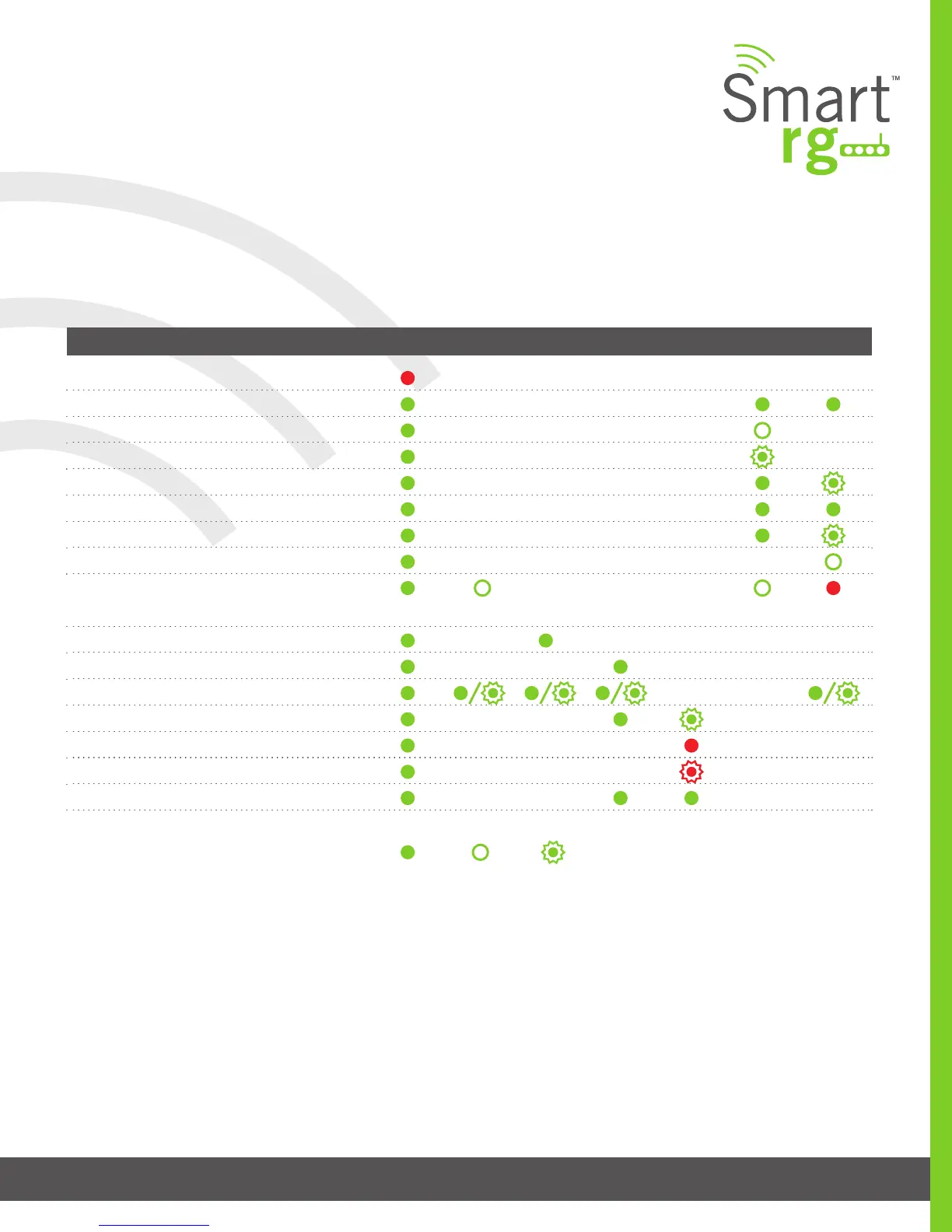
LED Status Indicators:
Your SmartRG gateway has several indicator lights (LEDs) on its front panel. The number of DSL ports or USB ports may vary from
model to model but generally, these indicators are available on all models:
POWER WAN LAN 1-4 WLAN WPS DSL 1 or 2 INTERNET
Power up test failure
DSL sync acqui red and gateway online
No sync to DSL line
DSL sync in progress
Mode m authenticatio n in progres s
DSL sync acqui red and gateway online
Gateway online and data transf er in progress
IP connec tion failure
Connec tion dropp ed – attempting
re-authenticat ion
LAN devic e on network connec ted
Wi-Fi enable d on modem
PC / network activity / data transf er
WPS Setup procedur e in progres s
Failure to find any partner with which to pair
Sessio n overlap detected. Possibl e securit y risk
WPS Connec tion complet ed successfully
: On : Off : Blinking / active



 To Next Page