38 - DESCRIPTION 91477A836/A
3 Control panel
4 Oven light
5 Seal
6 Door
7 Fan
8 Storage compartment
Frame shelf
Hob
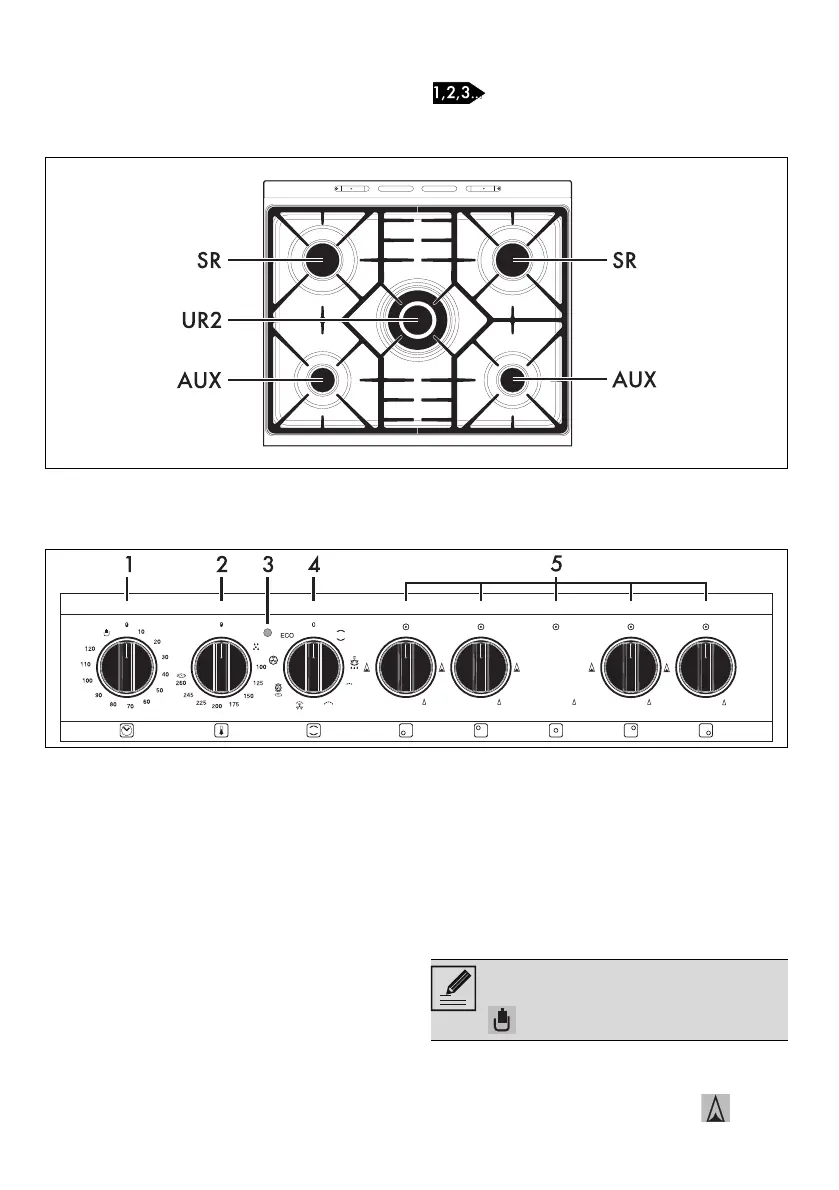
AUX = Auxiliary Burner
SR = Semi-rapid Burner
UR2 = Ultra Rapid Burner
Control panel
1 Minute minder knob
This knob allows you to select manual cooking
or the minute minder with automatic oven shut-
off at the end of cooking. To set the cooking
time, turn the knob clockwise until it reaches the
required position and then set the required
cooking function. The numbers indicate the
minutes. Adjustment is progressive, so the time
can also be set to any intermediate value
between the numbers indicated.
2 Temperature knob
This knob allows you to select the cooking
temperature. Turn the knob clockwise to the
required value, between the minimum and
maximum setting.
3 Indicator light
The indicator light comes on to indicate that the
oven is heating up. It turns off as soon as it
reaches the set temperature. It flashes regularly
to indicate that the temperature set inside the
oven is kept constant.
4 Function knob
The oven’s various functions are suitable for
different cooking modes. After selecting the
required function, set the cooking temperature
using the temperature knob.
5 Hob burner knobs
For lighting and adjusting the hob burners. Press
and turn the knobs anti-clockwise to in
To start cooking, it is necessary to set a
minute minder timer or manual cooking
using the minute minder knob.



 To Next Page