EN - 12
3.6 Accessing the
programming menu and
changing the settings
• Make sure that the machine is ready for
use and maintenance. Press the key (23)
for 5 seconds until all keys start to ash:
the machine is in programming mode.
• Set the machine to meet your requirements
(see the next page).
• To exit the menu, wait for 30 seconds
without pressing any key.
Setting the coffee temperature
• Access the programming menu.
• Press the key (20) to set the temperature of
the coffee.
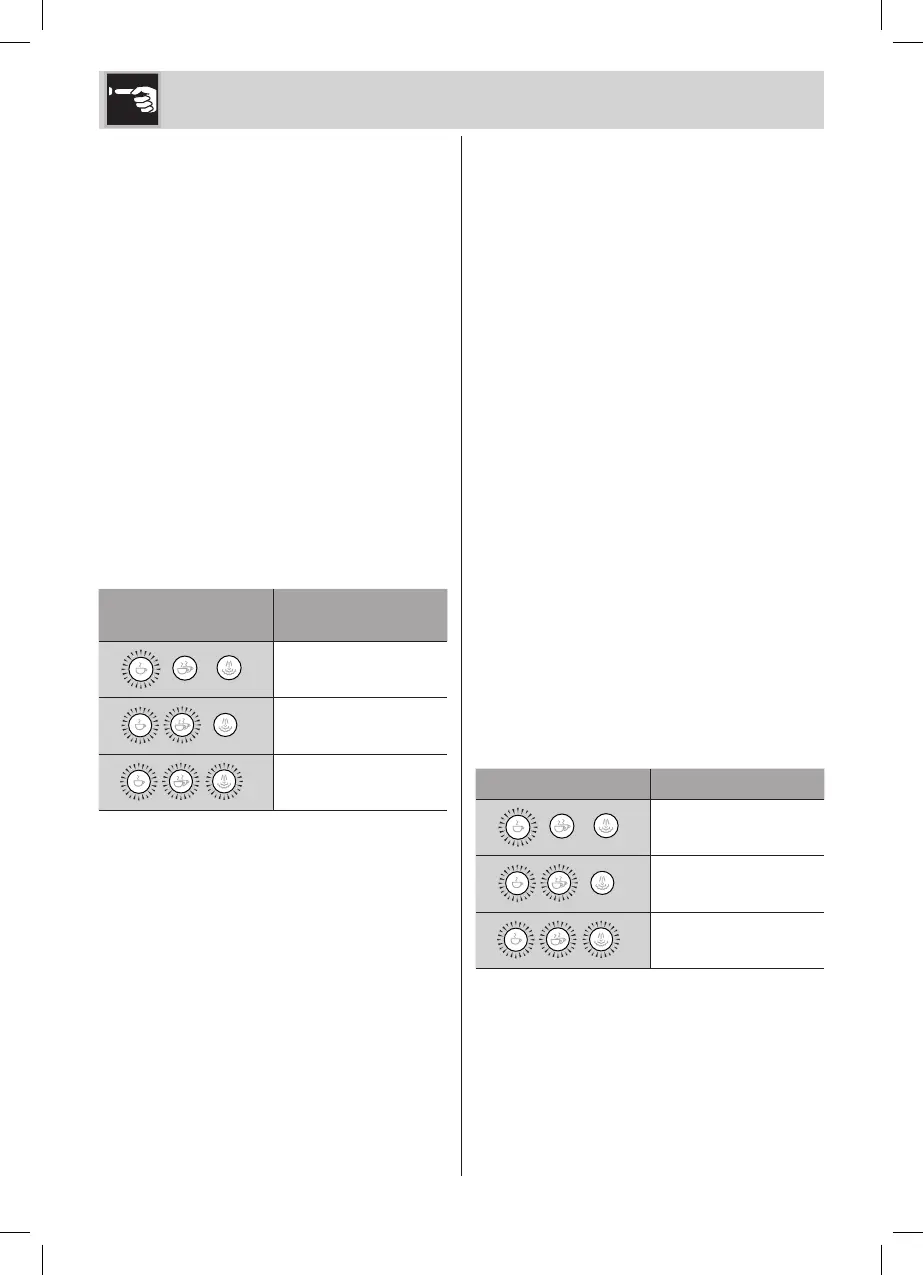
• The key (20) ashes 3 times, after which
the current setting LEDs turn on:
LEDs
Setting the
temperature
Low
Medium
High
• The LEDs start to ash in sequence.
• Press the key corresponding to the desired
temperature: low (20), medium (21) or high
(22).
• The key selected ashes to indicate the
selection has been stored and a single
sound is emitted if the acoustic signals are
activated.
Setting water hardness
• The machine is factory set to “Hard Water
Level”. The machine can also be set
according to the actual water hardness
in the various regions for less frequent
descaling.
• If you don’t know the water hardness, use
the test strip supplied (18) and follow the
instructions below.
• Remove the reactive strip supplied from its
packaging.
• Fully submerge the strip in a glass of water
for about one second.
• Remove the strip from the water and shake
it slightly. Read the results after approx.
one minute.
If 5 blue stripes appear on the strip, select
the “soft water” setting.
If 1 or 2 pink stripes appear on the strip,
select the “average water” setting.
If 3, 4 or 5 pink stripes appear on the strip,
select the “hard water” setting.
• Access the programming menu.
• Press the key (21) to set water hardness.
• The key (21) ashes 3 times, after which
the current setting LEDs turn on:
LEDs Setting water
Soft
Medium
Hard
Use


 To Next Page