Rev 0.0 17
USER INSTRUCTIONS
EN
2.3 Additional functions
(Customizing user parameters; available for all programs, except
soak)
2.3.1 Adjusting the water softener
N.B.: A DIFFERENT WASHING PROGRAM FROM SOAK MUST BE
USED TO MAKE THE FOLLOWING ADJUSTMENT.
The electronic control system incorporates an indirectly accessible program-
ming procedure for adjusting the level of water hardness. To access the pro-
gramming mode, switch on the dishwasher and close the door. Then:
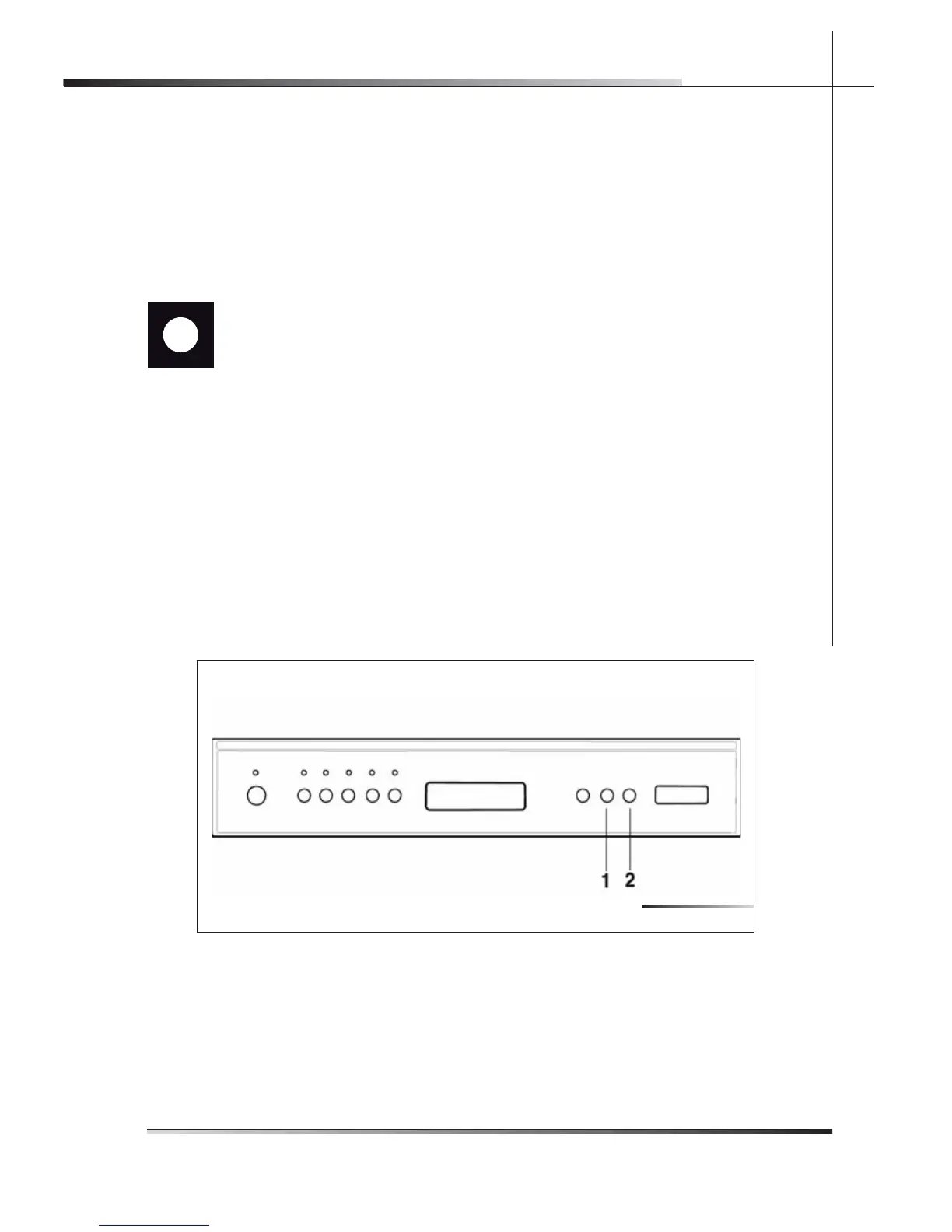
press the Program delay button (ref. 1 fi g. 2-09) until the symbol H followed
by the number 3, >H3, appears on the display;
then press the Program delay button (ref. 1 fi g. 2-09) to select the level of
water hardness (H0, H1, H2, H3, H4, H5);
press the start/pause button (ref. 2 fi g. 2-09) to confi rm and return to the
program settings menu.
N.B.: the appliance automatically exits the parameter setting menu after 2 min-
utes.
•
•
•
Fig. 2-09



 To Next Page