Use
55
EN
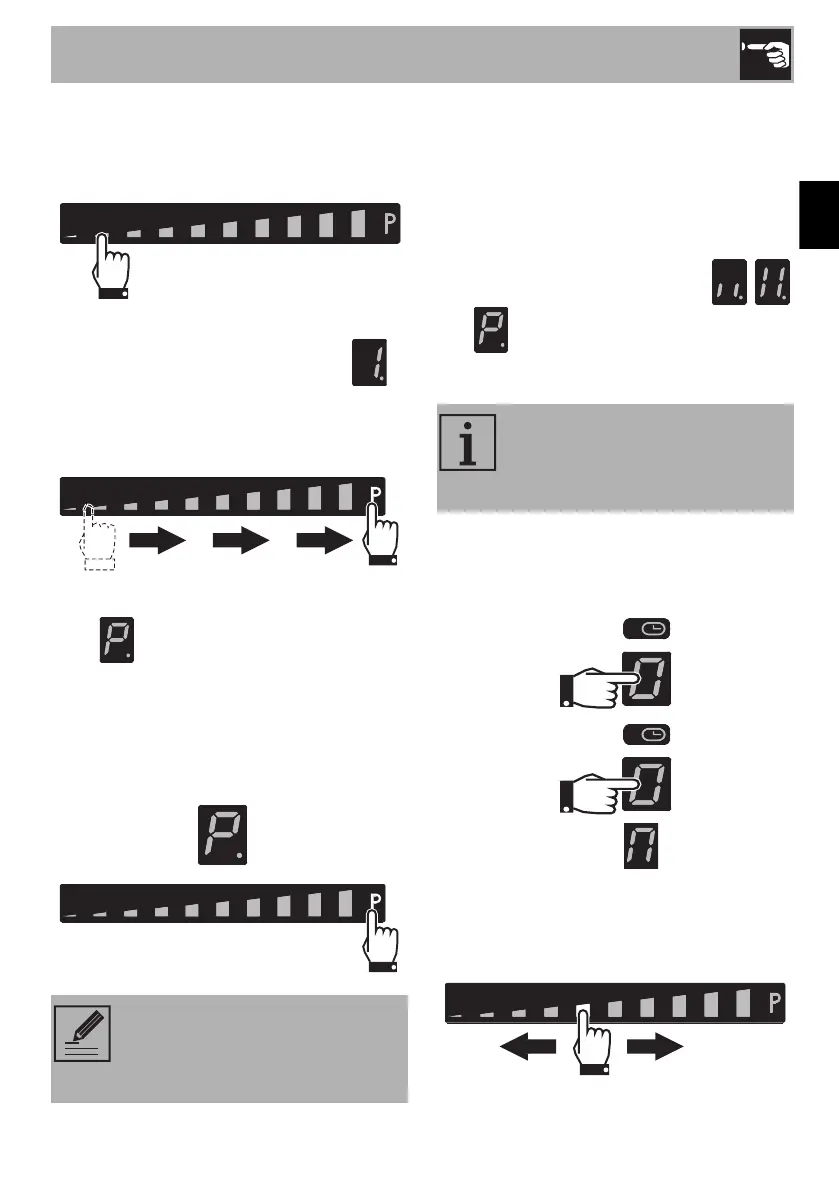
After switching on the hob and having
selected a cooking zone:
1. Place a finger on the left-hand side of the
scroll bar.
The display of the cooking zone used will
turn on: the power value indicated is .
2. Move your finger all the way to the right
of the scroll bar to select the Booster
function.
The display of the cooking zone used will
show .
The Booster function can be activated
quickly.
• After switching on the hob, place your
finger at the far right of the scroll bar of
the cooking zone you wish to use.
Double Booster function
The Double Booster function allows more
power to be supplied compared to the
Booster function.
After having activated the Booster function
for a cooking zone, press “P” at the far
right of the scroll bar. The symbols ,
and will be displayed in sequence.
Multizone function
After switching on the hob:
1. Place a finger simultaneously on the
buttons of two cooking zones one above
the other.
After a short beep, the symbol will
appear next to the button of the rear zone.
The Multizone function is now active.
2. Use the left-hand scroll bar to set the
required cooking power.
The Booster function remains
active for a maximum of 5 minutes,
after which the power is reduced
automatically to level 9.
This function can be used to
operate two cooking zones (front
and when using pans like fish
kettles or rectangular pans.



 To Next Page