35
GPP ELECTROFISHER
www.smith-root.com
Fig. 4.1
• Maintain GPP settings from Procedure 6.
• Start the generator.
• Press foot switches.
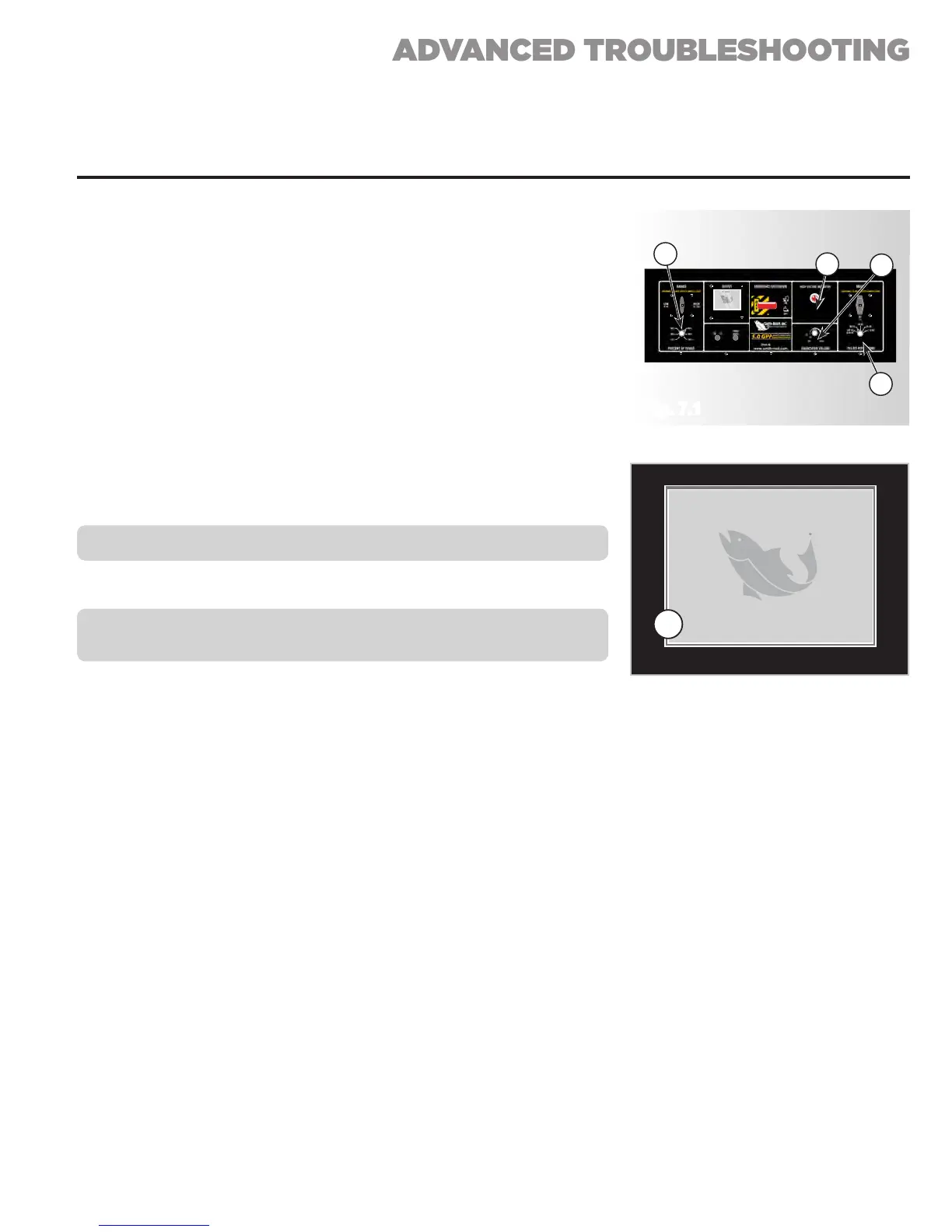
• When the Red Light (See Fig. 7.1, A) is illuminated, the display
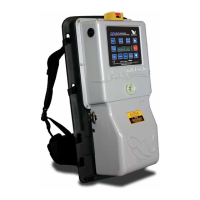
(See Fig. 7.1, B) should show current and voltage and the seconds
counter (See Fig. 7.2, C) should be counting.
• Adjusting the “Percent of Range” (See Fig. 7.1, D) up to 100% will
increase the amperage shown on the Current Meter.
• Set the “Percent of Range” to 50%.
• Switch the “Mode” switch (See Fig. 7.1, E) from 120 PPS to 60 PPS.
The amperage should drop by half.
Smith-Root, Inc.
Generator
Powered
Pulsator
D
E
B
A
Fig. 7.1
Fig. 7.2
PROCEDURE 7: TEST GPP CONTROL BOX
CAUTION: Never switch the Voltage Range while the output is ON.
• Retest settings in the high range.
NOTE: If output current is absent, return the control box to Smith-
Root.
Smith-Root, Inc.
Generator
Powered
Pulsator
© 2012GPP 9.0 V1.0.10
Peak Average
4vVoltage 2v
0.1
ACurrent 0.1A
0W 0WPower
120
HzFrequency
0
%Duty Cycle
120/170
VRange
1097Time (Sec)
HIGH CURRENT
ERROR
HIGH CURRENT
WARNING
Switch to Low Setting
Or Reduce Power
Output Disabled
Switch to Low Setting
Or Reduce Power
ERROR: SWITCH
ACTIVE AT RESET
Deactivate switch or
contact Smith-Root, Inc.
for Repair
ZERO-CROSS
TIMING ERROR
Contact Smith-Root, Inc.
for Repair
www.smith-root.com
(360)573-0202
14014 NE Salmon Creek Ave
Vancouver, WA 98686
www.smith-root.com
(360)573-0202
14014 NE Salmon Creek Ave
Vancouver, WA 98686
Peak Current
51.2
Average
36.7
Peak Current
51.2
Average
36.7
C
PROBLEM: NO OUTPUT FROM GPP ELECTROFISHER (CONT.)


 To Next Page