Then, please set motion detection alarm as following information.
Step1: On your monitor, please navigate to System Setup>Channel Setup>Video
Detection.
Step2: Please make sure Enable is checked. Select one channel, choose Motion in
Detection.
Step3: Motion sensitivity adjustment.
Step4: Select alert type including Buzzer, E-mail Notice and APP Alarm
Buzzer: your NVR box will start to beep when motion being detected.
E-mail Notice: you need to bind your email to the system if you want to receive
email alert. More information about how to bind email can be checked in FAQ.
Step5: Arming time: Factory Default Setting is 24 hours/ 7 days selected for motion
detection.
Click ‘Reset’ first and go to setup your own plan.
Step6: Area edit: Factory Default Setting is all areas selected for motion detection. If
device user like to change, please right-click mouse to clear all first. Then, select
motion detection area as you wish.
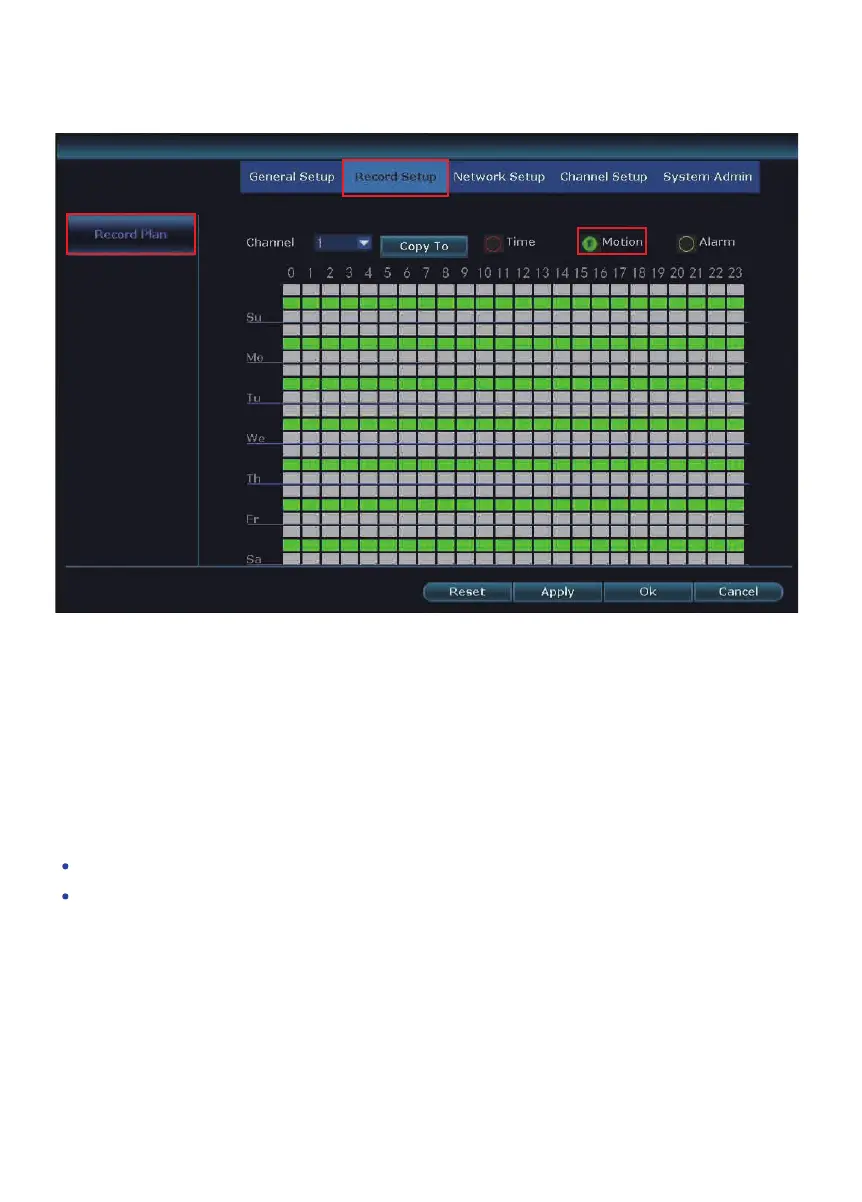
TYPE 2: Motion Activated Recording - In System Setup>Record Setup>Record
Plan page, please select Motion.
13


 To Next Page