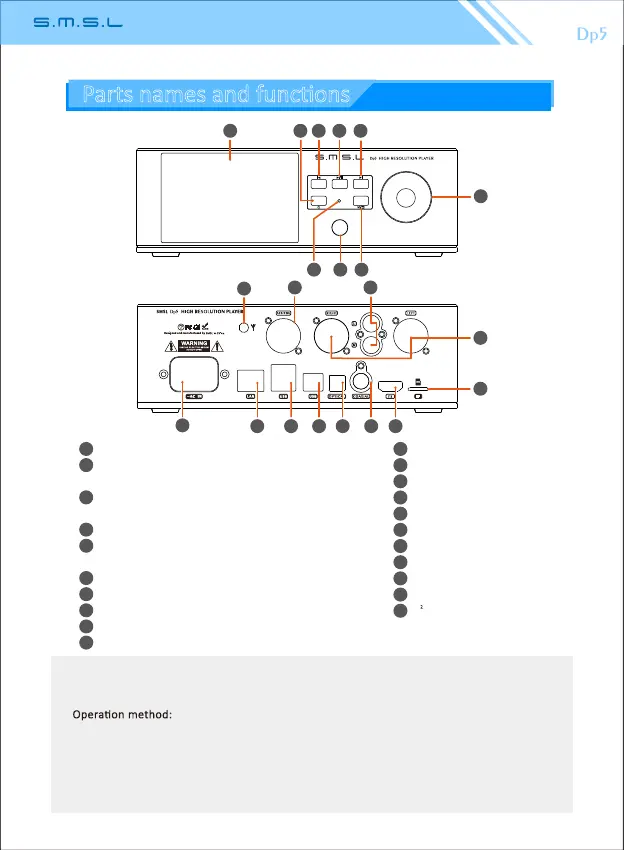
Display screen
Power buon, long press ON / OFF,
short press turn off display.
*
"Previous" buon, short press the previous
song, long press to rewind.
**
Play / pause
"Next" buon, short press next song, long
press fast forward
Knob
remote IR window
Unbalance headset 6.3mm interface
Return / exit
2.4G/5G dual frequency antenna
AES output
Line output
Balance output
Micro SD card slot
Power AC input
Network interface
USB 2.0 interface
USB Audio output
Opcal output
Coaxial output
I S output interface
2
29
1
2
3
4
5
6
7
8
9
10
12
13
14
15
16
17
18
19
20
11
21
1
2
3 4 5
6
7 98
10
11 12
13
14
15
16 17 18 19 20 21
Long press for more than 10 seconds in any interface and state to force shutdown.
Short press, when the current song playing me exceeds 10 seconds, press "Previous Song" to
restart playback of the current song. If it does not exceed 10 seconds, play the previous song.
Operaon method:
1.Mulfuncon knob:In the playback interface, turn le or right is the volume up or down,
short press middle buon pause, long press to enter the playback mode menu.Under the
menu, rotate le and right to select up and down, short press to confirm.
2.Play/pause buon: click to play or pause, double click to repeat current track.
3.Knob center indicator: red when off, blue when turned on, green when on/off.
(The mul-funcon knob center buon has the same funcon as the remote control confirma-
on key, and the return key has the same funcon as the remote control return key.)
*
**
Parts names and funcons



 To Next Page