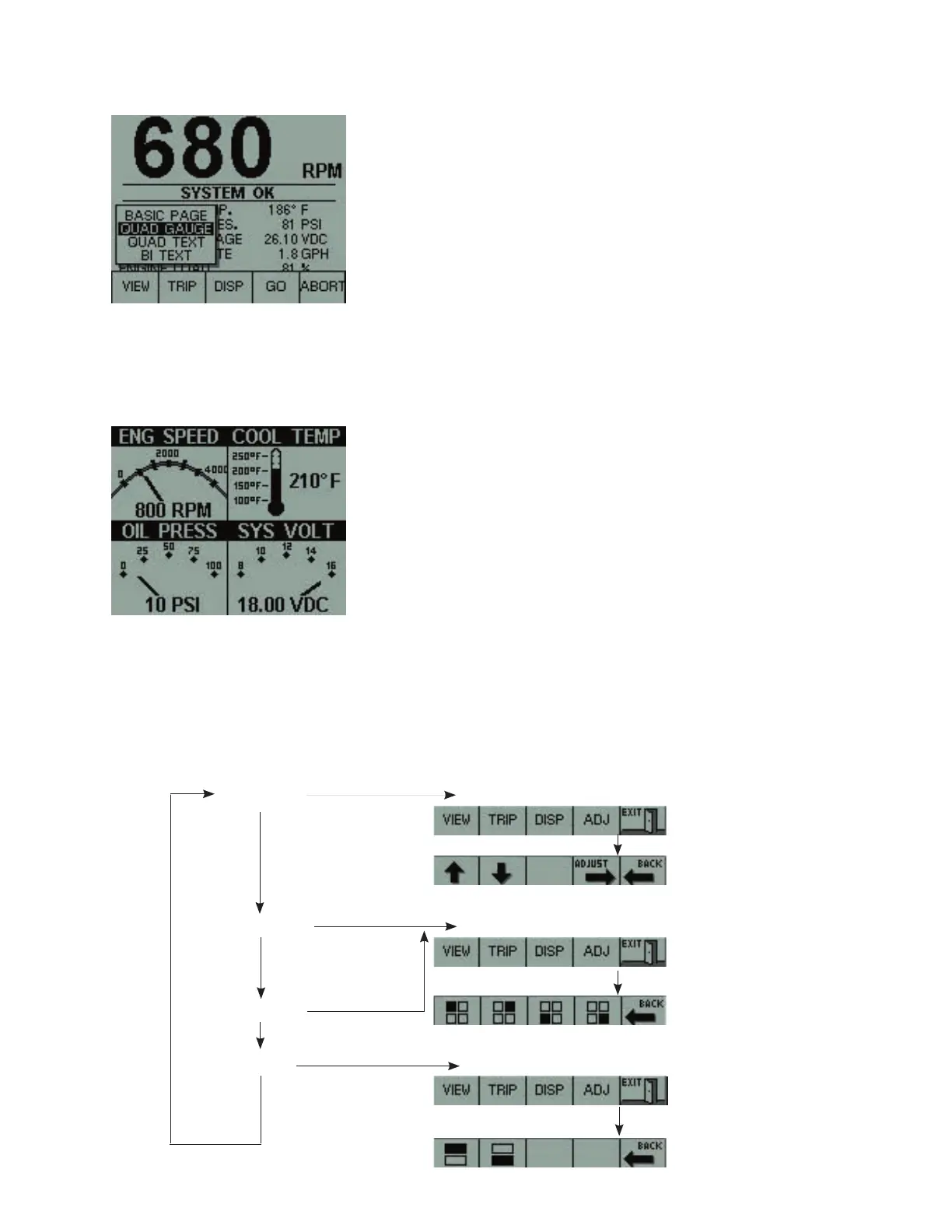
Navigation between pages
Pressing one of these keys will display a pop-up window. Pressing the same key again will
select the next item in the list.
Press GO (Key 4) to display the selected page.
Press ABORT to cancel the navigation and go back to the last displayed page.
Three different groups of pages
are available
.VIEW (Key 1)
.TRIP (Key 2)
.DISP (Key 3)
If no keys are pressed within 5
seconds, the pop-up window will
disappear and the selected page will
be displayed.
View group (VIEW – Key 1)
This group allows the display of available data in different formats. As in the BASIC PAGE,
pressing Key 4 can configure each view. Boat speed can be displayed only if GPS or a speed
transducer is connected on the RS422 input.
Navigate with Key 1
BASIC PAGE
QUAD GAUGE
QUAD TEXT
BI TEXT
Pressing Keys 1-4 will change the engine parameter in the quadrant selected.
Press BACK when done.
Pressing Key
1 or 2 will select the parameter to be changed. Press Key 4
until the desired engine parameter is displayed. Press BACK when done.
Press Key 4
Pressing Keys 1-2 will change the engine parameter. Press BACK when done.
Press Key 4
Press Key 4



 To Next Page