
 Need help?
Do you have a question about the Snap-On BK7000 and is the answer not in the manual?
Guidelines for maintaining a safe and clean work environment.
Precautions for user safety during operation and handling.
Safety measures related to the AC power adapter and its use.
Guidelines for safe handling, charging, and disposal of the battery.
Best practices for operating and maintaining the video scope.
Advice on proper handling, avoiding heat, and using accessories.
Instructions for cleaning, troubleshooting, and seeking professional service.
Additional safety advice and warnings beyond general guidelines.
Regulatory compliance statements for FCC and Industry Canada.
Warnings regarding hazardous environments, chemicals, and electrical charges.
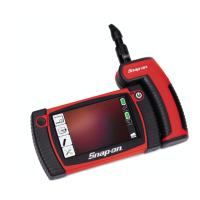
Overview of the BK7000 digital high definition videoscope features.
List of items included in the BK7000 package.
Initial setup description for the BK7000 videoscope.
Detailed technical specifications for the display unit.
Technical specifications for the imager module.
Technical specifications for the AC power supply.
Information on additional accessories for the BK7000.
Warnings about operating the videoscope in explosive atmospheres.
Ensuring the work area is safe before using the videoscope.
Daily inspection and charging procedures for the BK7000.
Instructions for attaching power outlet adaptors to the charger.
Steps for connecting the power cord and charging the BK7000 unit.
Table explaining LED status and battery status during charging.
Procedure for switching imagers on the BK7000 unit.
Steps for turning the BK7000 unit on and off using the power button.
Steps for initial registry setup and preparing the unit for use.
Selecting the display language and setting the time zone.
Connecting the BK7000 to a wireless network by entering a password.
Entering personal information for device registration.
Overview of buttons and icons on the BK7000 home screen.
How to adjust the LED brightness using the interface.
Step-by-step guide for capturing still images using the shutter button.
Guide for recording video using the red record button.
Configuring camera modes, device options, and audio settings.
Managing Wi-Fi, Bluetooth, and language preferences.
Device information, firmware updates, and licensing agreements.
Accessing and browsing captured media in the gallery.
Selecting and deleting items from the media library.
Adding audio/text annotations and renaming files.
Instructions for connecting the unit to a PC via USB to transfer files.
Enabling and connecting to a Wi-Fi network from the main menu.
Pairing the BK7000 with Bluetooth devices.
Procedure to reset the BK7000 to its original factory default settings.
Troubleshooting common problems with the display, power, and charging.
Details on the limited two-year warranty and its coverage.
Contact information for regional repair and service centers.
Compliance statements for FCC, Industry Canada, and RF exposure.
Usage restrictions for specific 5G frequency bands.
 General
| Brand | Snap-On |
|---|---|
| Model | BK7000 |
| Category | Diagnostic Equipment |
| Language | English |




 To Next Page