9
ZCT9010NA Rev. A (08/20)
Quick Release Model - CT9010QC
IMPORTANT
This model uses 1/4” hex accessories.
1. To install an accessory, pull the collar away from the
tool.
2. Insert the accessory and release the collar.
3. To remove an accessory, pull the collar away from the
tool and remove the accessory. Then release the
collar.
Using the Speed Selector
The speed selector button is used to control the anvil
speed, impact frequency, and torque output of the tool.
A B
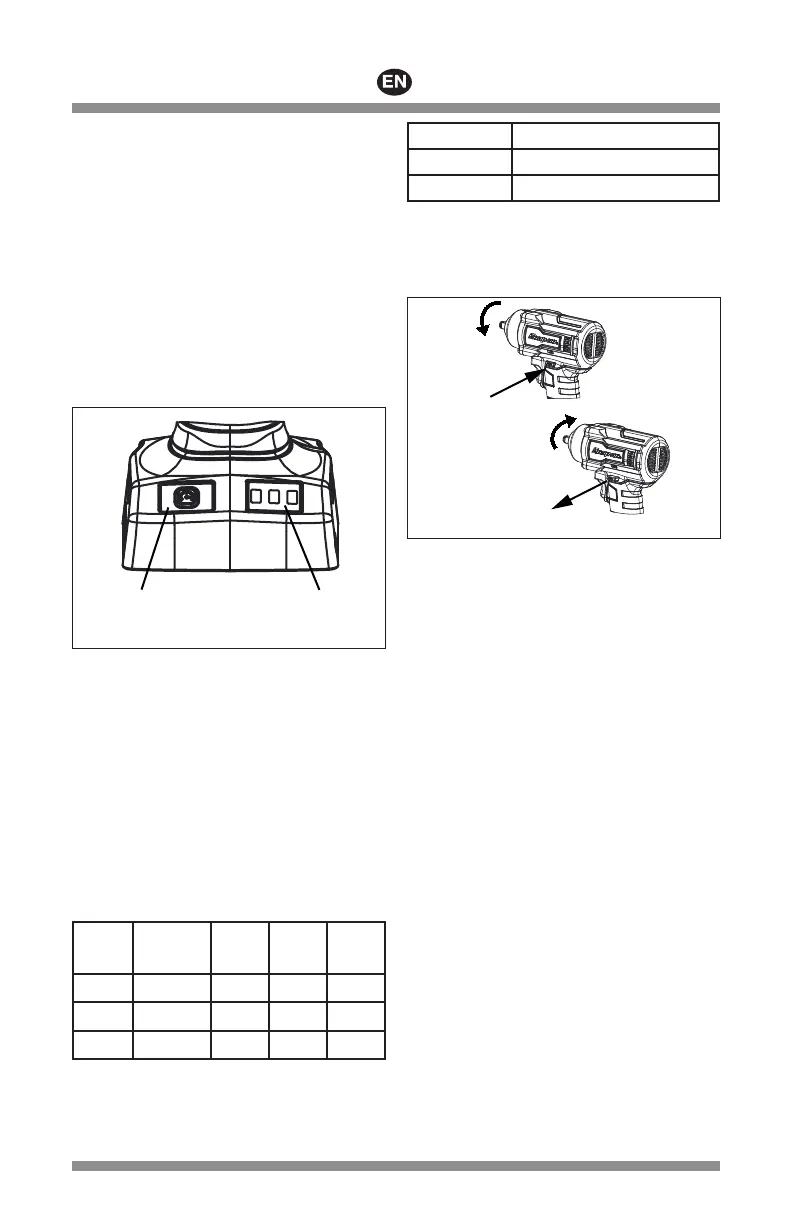
Figure 2: Speed Selector
A – speed selector button
B – speed selection display
The speed settings can be set independently for CCW
(reverse) and CW (forward). This feature can be used to
remove fasteners with full speed and reinstall them with
improved control at a lower speed.
1. Press the speed selector button or pull and release
the trigger to activate tool. The current speed
selection will be shown according to the speed
selection display.
2. Press the speed selector button to cycle through the
three (3) speed modes until the desired setting is
shown, then begin work.
SPEED
SETTING
SPEED
SELECTION
DISPLAY
SPEED IPM
TORQUE
%*
1
0-870 0-1740 0-25%
2
0-1300 0-2600 0-50%
3
0-1760 0-3520 0-100%
* Effect on torque % obtained using a 7/8” hex bolt.
Always use a torque wrench to verify torque.
LIGHT COLOR DIRECTION
Green CCW (reverse)
Red CW (forward)
Forward/Reverse Switch
The forward/reverse switch determines the rotating
direction of the anvil, either clockwise or
counterclockwise.
A
B
Figure 3: Forward/Reverse Switch
A – Depress switch for reverse or
counterclockwise rotation.
B – Release switch for forward or clockwise
rotation.
To change the direction of anvil rotation:
1. Be sure the impact wrench is stopped and not
operating.
2. The position of the forward/reverse switch
determines the direction of the anvil rotation. Switch
positions, when tool is positioned as above, are:
— Forward (B), the anvil rotates clockwise,
— Reverse (A), the anvil rotates counterclockwise.
3. The switch must be in either the forward or the
reverse position to operate. Center position locks the
switch off.
Trigger
Depress the trigger to rotate the anvil. The lever must be
in a forward or reverse position to operate. The trigger
can be locked in the OFF position. Locking the trigger in
the OFF position helps to reduce the possibility of
accidental starting the impact wrench when not in use.
Place the lever in the center position to lock the trigger.
Lock the trigger when not in use.


 To Next Page