6. Download the Snoppa App
App Store
Available on the
Download
Apk
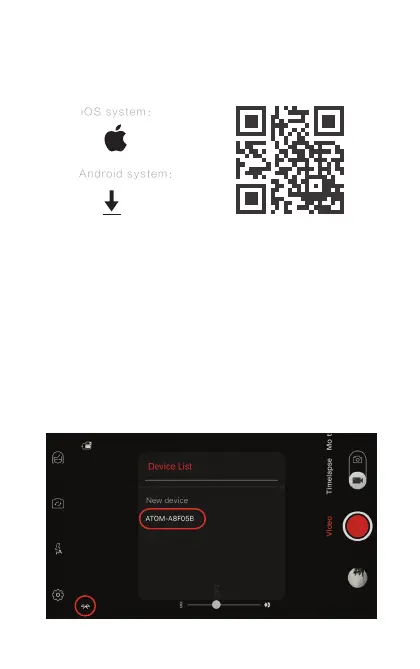
Please scan the barcode bellow, or search for “Snoppa” in the App
store for iOS or Google Play for Android.
Notice: Snoppa App only support IOS 8.0 or later, and Android
6.0 or later.
7. Bluetooth connection
[1] Make sure the Bluetooth in the phone is turned on.
[2] In the Snoppa app, press the Bluetooth icon on the corner. In
the popup menu choose the ATOM device to connect and pair.
(You can also connect the ATOM Bluetooth in the phone system
setting panel directly, in order to use the phone camera app or
other lming app)
6
1.Click on the Bluetooth icon
2.Click to pair


 To Next Page