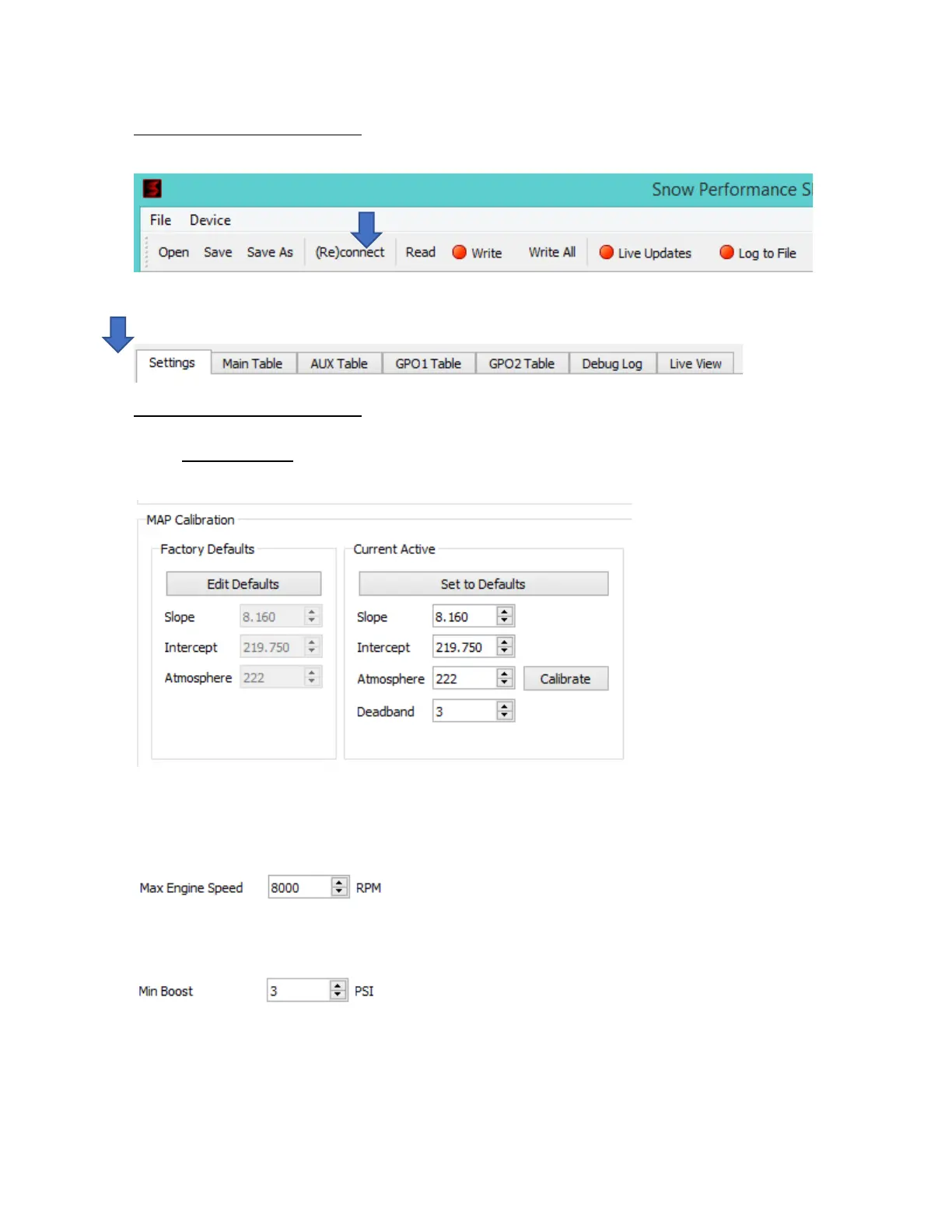
Always, Always, Always, Always start by clicking the Read button from the top menu. This will ensure that
the current calibration loaded in the controller is imported into the software.
Ensure you are on the Settings tab:
Always, Always, Always, Always ensure the MAP sensor values match the MAP sensor being used by the
controller. Unit is pre-loaded from the factory with the values for the 100PSI MAP sensor. Once set these
values SHOULD NEVER be changed. If these settings are wrong for the MAP sensor being used – the unit
will not read correct boost and your Water Methanol Injection will not function properly (if at all)
Next, focus on the Basic Config. These settings are VERY IMPORTANT because they set the controller limits
of operation.
Enter the Max Engine Speed value that’s 500-1000RPM higher than your REV limit
Enter the Minimum Boost value that you want to see in the pump duty table. This value should be a few PSI
lower than the boost pressure at which you want to start injecting.
Enter the Maximum Boost value that you want to see in the pump duty table. This value should be a few PSI
higher than the maximum boost that can ever be developed in this setup.



 To Next Page