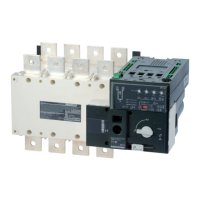
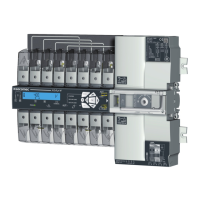
12
EN
STEP 5
Programming
Check
STEP 6A
Automatic operation
Close the front cover as shown to put the
product into automatic mode.
STEP 4
Whilst in manual mode, check the
wiring and if ok power up the
product.
STEP 6B
Manual operation
• Open the front cover as shown to put
into manual mode.
•
Use the handle situated in the front
panel under the cover to operate the
transfer switch.
•
Check the changeover switch position
on the indicator before operating.
To simplify operation
use the handle with the
extension provided.
(Max 8 Nm)
90º 90º
Extension
The LED signalling and operation is only active when the product supply is available.
To set the dip switches, it is necessary to open the Auto/Manual cover.
Commissioning must always result in having at least 1 LED source available on.
(Therefore, the voltage and frequency must be within the defined thresholds).
Any action on the potentiometers will change the settings, even when the cover is closed.
Source LED ON LED OFF LED blinking
Source 1 available Source 1 not available
or out of range
- a timer is counting down
- test mode
Source 2 available Source 2 not available
or out of range
- a timer is counting down
Source availability LED
• E: No stop in O position
• F: 2s stop in O position
Stop in 0 position: E-F
• G: Network - Genset
• H: Network - Network
Type of application: G-H
Dip switch settings
LED info
Source supply voltage
andfrequency
Auto-Configuration
A
E
Hysteresis settings
B
Loss of priority source timer
FT: 0-60 sec.
FT
RT
U/F
[HYST]
[HYST]
RT: 0-30 min.
U/F
Timer settings
C D
Fault reset
Return of priority sourcetimer
LED ON LED OFF LED blinking
Fault Product OK or
S1-S2not available
Please wait
Auto mode Manual mode Manual retransfer
Fault and state of the product LED's
STEP 6C
Padlocking mode
• In order to padlock put the product in
manual mode.
•
Pull the locking mecha nism and insert
a padlock as shown.
• As standard padlocking in the 0 position.
Configurable to I-0-II (see step 1).
1x 4-8 mm
LED state Auto Conf result Action
Steady ON OK Ready
Blinking Not OK Go back to step 4
Ensure that the supply
voltage is available and
within the following limits:
Un: 176-288VAC
Fn: 45-65Hz
Press PROG for ≥ 2s
HYST: 20 %DU/F
DU: 5-20%
DF: 3-10%



 To Next Page
 Loading...