Specifications
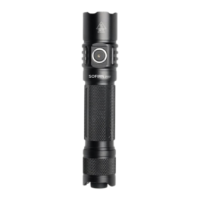
1 x SST40 LED
Voltage: 2.8 - 4.2 volts
Battery option: one 18650 li-ion battery
Dimension: 125.5mm(length) x 25.4mm(head diameter)
Net Weight: 61g without battery
Made by Aircraft 6061 grade-aluminum alloy, Premium type Ⅲ hard-anodized anti-abra
sive finish to get solid built body, anti-crash.
Toughened glass lens
Mode Memory: It memorizes the last brightness level used in the general modes. It will
activate the last brightness you selected, when you turn on the flashlight next time.
Advanced temperature regulation (ATR) technology: it adjusts the brightness level
automatically when the light temperature reaches 45℃ to keep the light from
overheating. You can reset the temperature limit, please contact us if you want to know
more details.
Low Voltage Protection: LVP makes the light step down to a lower level when the
battery is lower than 2.8V, and if the light is already at the lowest level, it shuts itself
off.
Getting started
Before using the flashlight, unscrew the tailcap from the tube and remove the insulating
plate on the battery pole (if the battery is supplied with the flashlight). Reinsert the battery
with the anode side (+) towards the head, then screw the tailcap back onto the tube. Make
sure to fully charge the battery before first use.
Recharging
1. SC31T Pro offers a USB-C port for convenient recharging of its 18650 battery.
2. Please go to standby mode before charging: click the tail switch to turn on the light,
then click the side switch to enter Standby mode (main led is off but side switch led is on).
3. Please connect it with the included USB A to USB C cable and use a USB power adapter
(not included) with 5V 1A. While charging, the side switch indicator is red. It turns to Green
when it's fully charged.
Operation Instructions



 To Next Page