14
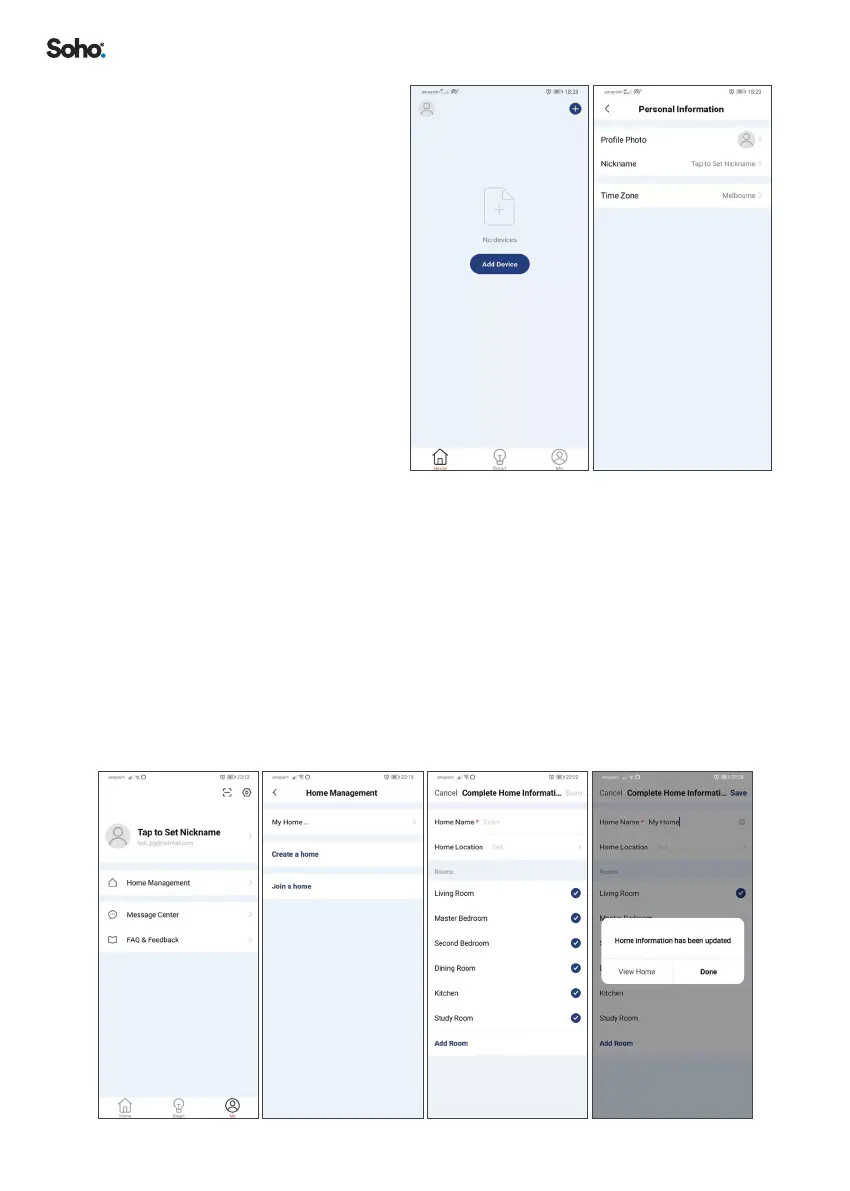
8.4 SETTING ‘PERSONAL
INFORMATION’ ON THE APP
The App allows you to edit your
prole photo, nickname and
time zone�
1. Select ‘HOME’ on the menu
at the bottom of the screen�
2. Click on the ‘Avatar’ icon at
the top left of the screen�
3. Then set your ‘PROFILE
PHOTO’, ‘NICKNAME’ and
‘TIME ZONE’�
8.5 HOME MANAGEMENT CONFIGURATION
To enable extra purier control options, like adding other users and setting up
automated tasks, follow the steps below� You can also set up Home Management
later�
1. Select ‘ME’ on the menu at the bottom of the screen�
2. Select ‘HOME MANAGEMENT’�
3. Then select ‘MY HOME..’ to congure your default home setting�
4. Add a ‘HOME NAME’, then set ‘HOME LOCATION’� After this step, you can
choose to add or delete the types of ‘ROOMS’ for your home setting�
5. Always select ‘SAVE’ when you have nished making changes�


 To Next Page