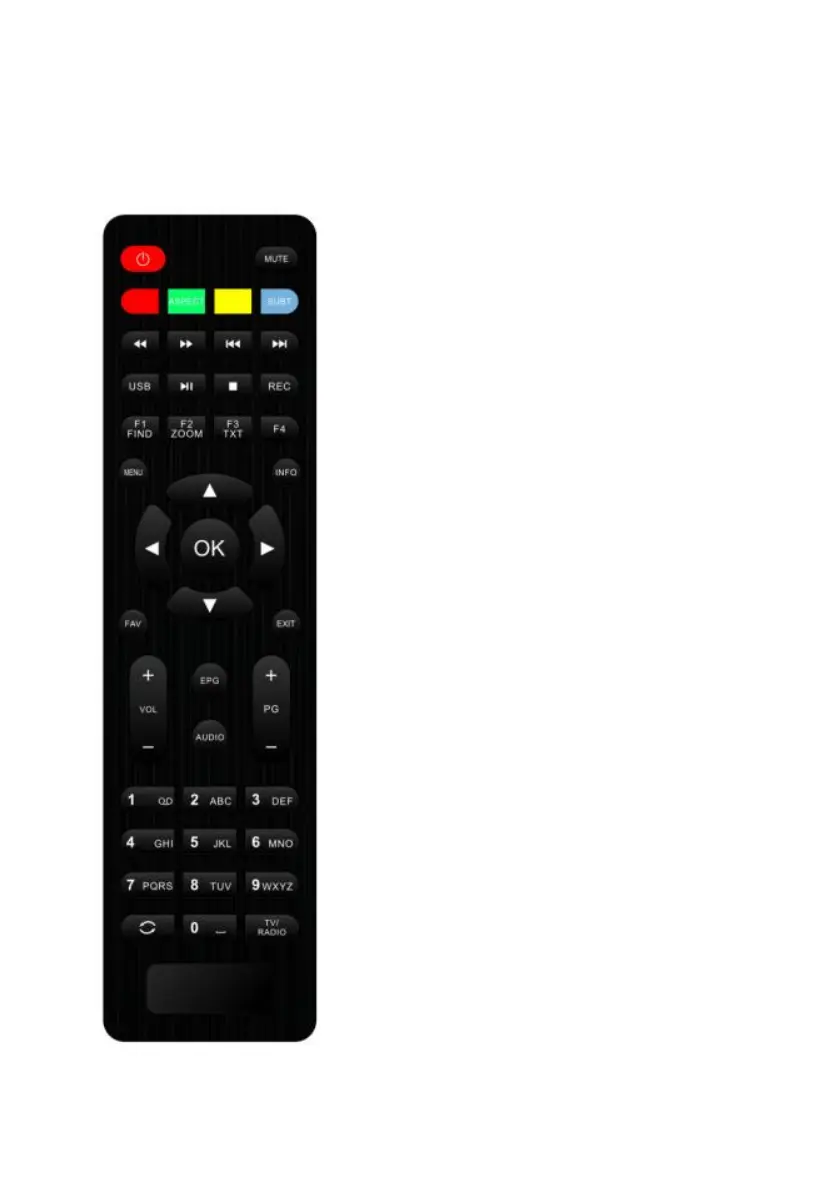
Remote control
This is the remote control of the product. Please note that he picture is for references
only, please make the object as the standard.
1. POWER: To switch ON/OFF the receiver power supply.
2. MUTE: To mute or restore the sound.
3. RED, GREEN, YELLOW, BULE KEYS: Multi-function keys
in menu mode.
4. PREV: To change into the previous play.
5. NEXT: To change into the next play.
6. PLAY/PAUSE: to pause and play the file when you press play /
pause key.
7. STOP: To stop the current play or to stop the current record.
8. USB: The shortcut key to the USB menu.
9. FIND: Enter into a menu to search the channel you want.
10. TXT: To open txt page on the channel, this has information of txt.
11. ZOOM: To magnify a certain area on the images
12. RECORD: To make record of play.
13. MENU: Display the main menu or return to the previous one.
14. INFO: The shortcut key to the information menu.
15. OK: To carry out the selection and enter into chosen menu.
16. CH Up/Down: To turn the next or previous channel and to move
the highlight bar for selecting options to upward or downward on
the menu.
17. VOL Left/Right: To adjust the sound volume up or down and to
move the highlight bar for selecting options to right or left on the
menu.
18. FAV: The shortcut key to favorite menu.
19. EXIT: To exit from the menu or pop-up window or cancel the
present running functions.
20. VOL +/-: To adjust the sound volume up or down
21. PAGE +/-: To move up the cursor to the next or previous page in
the menu or channel list.
22. EPG: The shortcut key to the EPG menu.
23. AUDIO: To elects the audio mode among Left / Right / Stereo /
Mono.
24. NUMBER KEYPAD: To select TV/Radio channel and enter to
programming parameters by the numeric keys and to input the
character by the alphabetical keys.
25. TV/RADIO: To switch between TV and RADIO.
26. RECALL: To return to the previously viewed channel.


 To Next Page