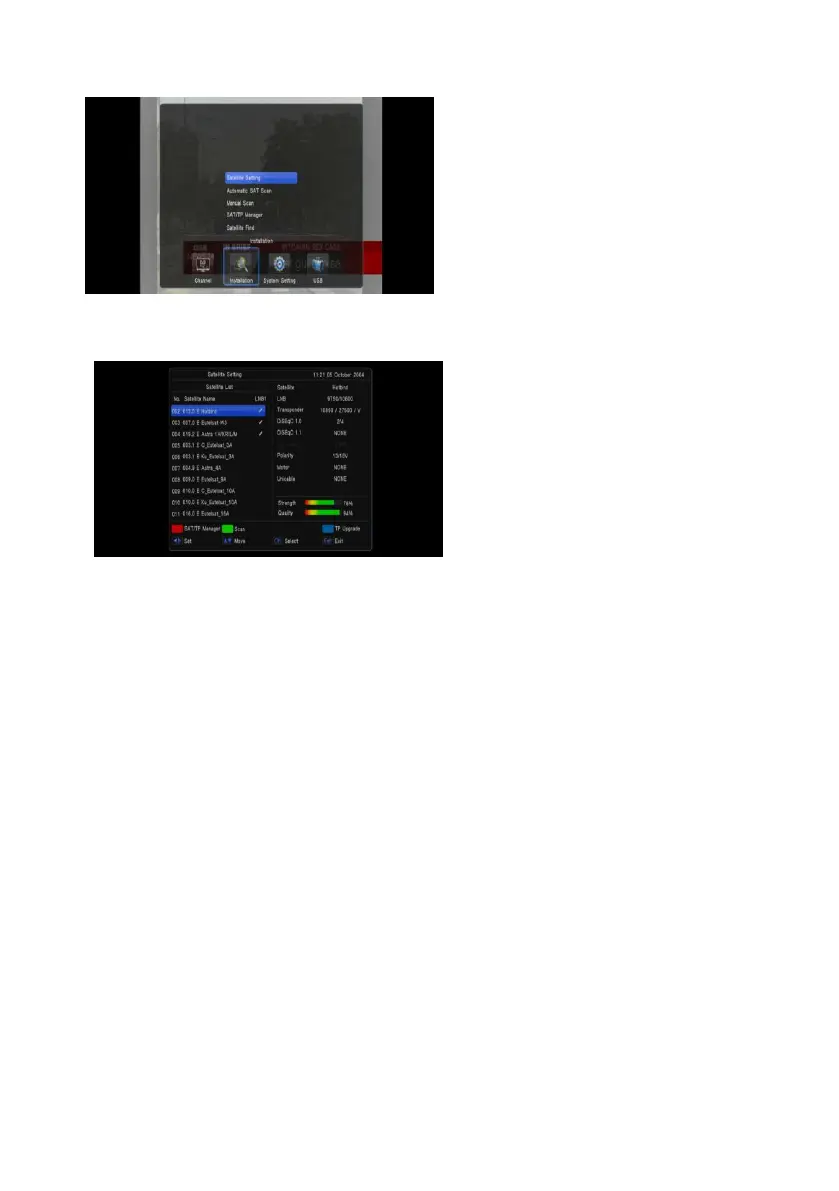
2.1.2 Installation
By pressing [Menu] and press [Vol+/-] to move
the highlight on the Installation
When the highlight on the satellite setting, press OK key to satellite setting menu
When the focus on the satellite list, you can
press OK key to setting which satellite will be
select with LNB
You can press RED key to set SAT/tp Manager
Press Green key to start channel search
Press blue key to update transponder from
network
1 Satellite: In this item, press [Volume Up/
Volume Down] key can switch Satellites and press [OK] key can enter satellite list for you to
select directly.
2 LNB Freq: In this item, press [Volume Up/ Volume Down] key can select the parameter. Option is
5150/5750/5950/9750/10600/10700/10750/11300/5150-5750/Universal(9750-10600)
/Universal(9750-107500)/and MDU
3 DiSEqC1.0/1.1: You can use [Volume Up/ Volume Down] key to switch options. There are several
options for your selection: Disable / LNB1 / LNB2 / LNB3 / LNB4
4 22K: You can use [Volume Up/ Volume Down] key to switch “ON / Off”. When this item is
switched to “ON”, receiver will receive TV and radio input signal from 22K port. If the item is
switched to “Off”, the receiver will receive all signal from 0K port.
! Notice
When you choose LNB type “Universal”, you can not modify 22K.
5 Polarity: In “Polarity” item, [Volume Up/ Volume Down] key to switch “Auto/ H / V” functions.
6 Motor:You can use [Volume Up/ Volume Down] key to set Antenna type by Motor
7 Unicable:You can use [Volume Up/ Volume Down] key to set unicable enable or none


 To Next Page