80
MANUAL ADJUSTMENT OF BREWING TEMPERATURE
You can manually increase or decrease water temperature for brewing by 1 °C or
2 °C.
Different kinds of coffee beans might require different brewing temperatures to
develop their optimal aroma, depending on the region of origin or the roasting.
Should your espresso taste slightly "ashy", you can decrease brewing temperature by
1 °C, should it seem slightly "sour", you can increase brewing temperature by 1 °C.
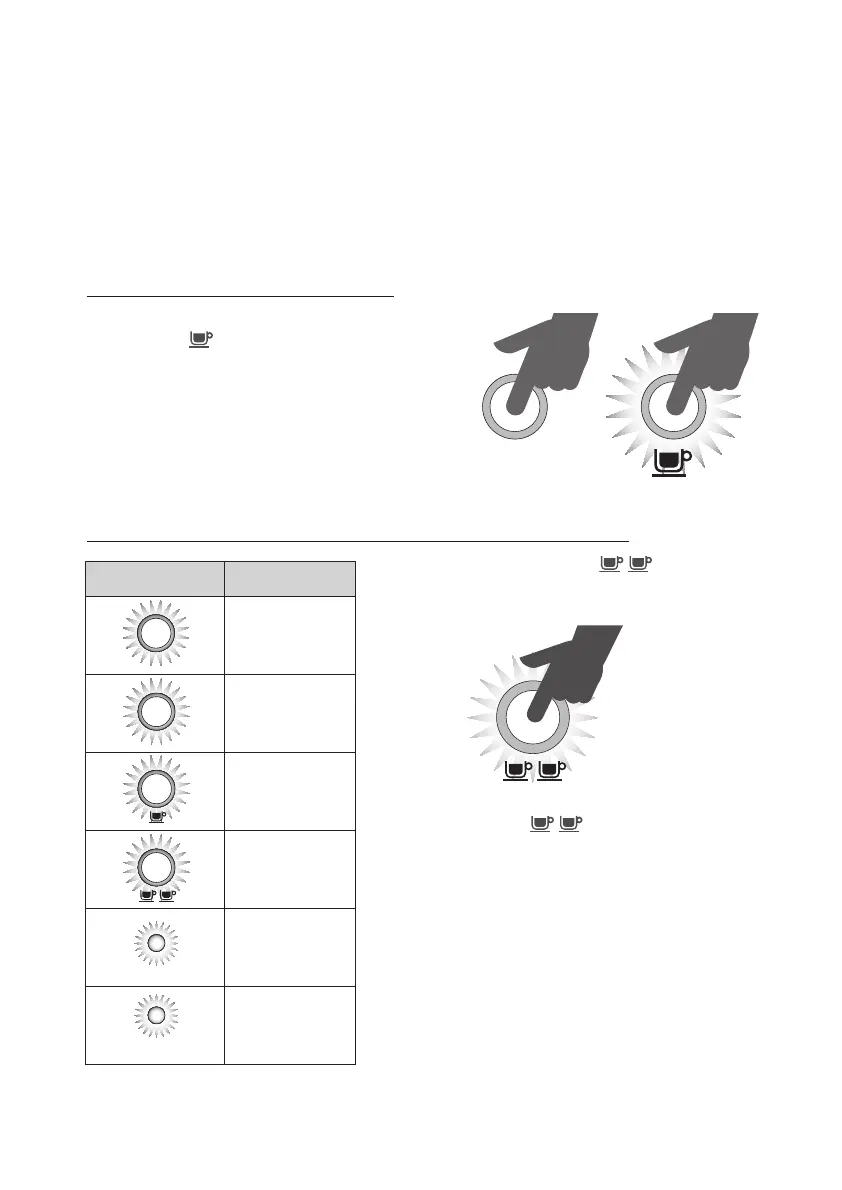
How to change brewing temperature:
– If your appliance is switched off, press and
hold the
button. Then, simultaneously
press and hold the POWER button.
– A single acoustic signal will sound to indi-
cate that the temperature setting can now
be changed.
– The appliance‘s current setting will illuminate.
Please refer to the table depicted below.
Specifically, the illuminated displays indicate the following settings:
– Every time you press the
button, the
setting will change. You can make adjustments
between –2 °C and +2 °C or return to the basic
setting.
– Please note: If the
button is not pressed
within 10 seconds, the appliance will return to
Standby-mode and you will have to start over.
– When you have finished your personal setting
and the desired display illuminates, an acoustic
signal will sound twice, indicating that your
setting has been saved.
– Subsequently, your appliance will return to
Standby-mode.
POWER
Displays Description
POWER
Basic setting
HOT WATER
STEAM
POWER
CLEAN ME
PROGRAM
–2 °C
HOT WATER
STEAM
POWER
CLEAN ME
PROGRAM
+2 °C
HOT WATER
STEAM
POWER
CLEAN ME
PROGRAM
Change setting
CLEAN ME
–1 °C
HOT WATER
STEAM
+1 °C
Downloaded from www.vandenborre.be




 To Next Page