4
2. Installation
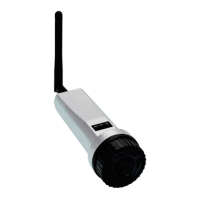
Step 2: Attach the antenna and plug the logger into the COM port
A.Screw the antenna onto the logger. Then plug the logger into the COM port. Be sure
the LED indicator lights are facing forward. The logger will only plug in if the joint matches.
B.Twist the black lock ring at the top the logger clockwise until it feels snug against the
bottom of the inverter. Be careful not to rotate the silver casing during this step.
match the joint
2.3 Connecting Multiple Inverters to One Data Logger
First, the inverters must first be daisy-chained together with RS485. The logger can
support a maximum of ten inverters. If there are more than ten inverters on the same
system, then additional loggers must be installed. Please see the inverter manual for
instructions on how to complete the daisy chaining.
Step 1: Daisy chain the inverters together with RS485 communication cable.
Step 2: Plug the data logger into the first inverter in the daisy chain.
Step 3: Adjust the address for each inverter.
Note: The first inverter should be set to 01. Each of the other inverters in the chain must
be set to a number other than 1.To do this,follow the steps:
A. Go to the Settings menu of each inverter and then to the Address submenu.
B. Use the up/down buttons to change the address number
C. Press enter to save the new address of the inverter
For example:
Inverter 2 = address of 2, Inverter 3 = address of 3... Inverter 10 = address of 10
Step 4: Commission the logger like normal. Each inverter in the daisy chain will populate
into SolisCloud once the logger transmits the first data packet.
The logger will collect and transmit information from all of the inverters in the daisy chain
to SolisCloud. Only the logger gets added to the new plant on SolisCloud. The inverters
will automatically populate into the plant once the logger starts to report to SolisCloud.


 To Next Page
 Loading...