EasyManua.ls Logo

Solo 365 - User Manual

Solo 365
11 pages
Print Icon
To Next Page IconTo Next Page
Loading...
User
Manual
www.solo-tester.com
Question and Answer IconNeed help?

Do you have a question about the Solo 365 and is the answer not in the manual?

Summary

General Safety Warnings

Height Safety and Operational Precautions

Exercise caution, wear PPE, maintain balance, and avoid overhead hazards when operating at height.

Component Handling and Battery Safety

Avoid touching hot components and follow strict guidelines for handling Lithium Ion batteries to prevent risks.

General Instructions

Preparation For First Use

Charging the Battery

Instructions for charging the Lithium Ion battery pack using the supplied mains adaptor and USB connection.

Installing the Smoke Generator

Step-by-step guide on how to securely insert the smoke generator into the Solo 365 unit, avoiding exposed contacts.

Using Solo 365

Powering on the Unit

Procedure for powering on the Solo 365 by holding the power button for 3 seconds and checking status indicators.

Carrying Out a Simple Test

Steps for performing a basic smoke test, including placing the cup over the detector and observing status indicators.

LED Indicator Reference Chart

Explains the meaning of various LED color and flashing patterns for status, consumables, and torch.

Removing & Replacing Consumables

Removing the Battery for Charging

Steps to unclip and remove the battery pack for charging via USB, ensuring the unit is powered off.

Troubleshooting

Detector Not Activating

Steps to take if a detector does not activate during testing, including checking battery and re-testing.

Unit Not Switching On

Troubleshooting steps for when the unit fails to power on, focusing on battery charge and connection.

Smoke Not Being Generated

Diagnosing issues with smoke generation, checking cartridge and generator status and indicators.

Fan Not Rotating

Troubleshooting steps for a non-rotating fan, involving checking for obstructions and using an air duster.

Support & Technical

Summary

General Safety Warnings

Height Safety and Operational Precautions

Exercise caution, wear PPE, maintain balance, and avoid overhead hazards when operating at height.

Component Handling and Battery Safety

Avoid touching hot components and follow strict guidelines for handling Lithium Ion batteries to prevent risks.

General Instructions

Preparation For First Use

Charging the Battery

Instructions for charging the Lithium Ion battery pack using the supplied mains adaptor and USB connection.

Installing the Smoke Generator

Step-by-step guide on how to securely insert the smoke generator into the Solo 365 unit, avoiding exposed contacts.

Using Solo 365

Powering on the Unit

Procedure for powering on the Solo 365 by holding the power button for 3 seconds and checking status indicators.

Carrying Out a Simple Test

Steps for performing a basic smoke test, including placing the cup over the detector and observing status indicators.

LED Indicator Reference Chart

Explains the meaning of various LED color and flashing patterns for status, consumables, and torch.

Removing & Replacing Consumables

Removing the Battery for Charging

Steps to unclip and remove the battery pack for charging via USB, ensuring the unit is powered off.

Troubleshooting

Detector Not Activating

Steps to take if a detector does not activate during testing, including checking battery and re-testing.

Unit Not Switching On

Troubleshooting steps for when the unit fails to power on, focusing on battery charge and connection.

Smoke Not Being Generated

Diagnosing issues with smoke generation, checking cartridge and generator status and indicators.

Fan Not Rotating

Troubleshooting steps for a non-rotating fan, involving checking for obstructions and using an air duster.

Support & Technical

Overview

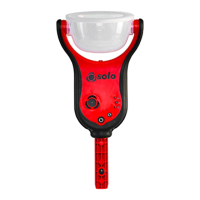
The Solo 365 is an electronic smoke detector tester designed for functional testing of smoke detectors in the field, offering health, safety, environmental, and technological advantages through electronically generated smoke. It is intended for indoor use and should be handled and stored with care, as dropping it on a hard surface could cause damage. The device is not designed for use in hazardous areas (those containing explosive vapor or dust) or in environments with high temperatures, humidity, direct sunlight, near heat sources, sandy or dusty conditions, strong magnetic fields, or places prone to strong vibration. It can be used in ceiling and floor voids, provided the unit and cup can pass through gaps in both directions.

Function Description:

The Solo 365 automatically generates smoke when a detector enters its clear cup, initiating a test. It features a proximity sensor that starts the test, and an automatic LED torch that illuminates in low light conditions for easy alignment, switching off once the test begins to provide a clear view of the detector's LED. The device includes a "Clearing mode" that blows air into the detector to remove lingering smoke after a test. A "Delayed Start" feature allows for a 20-second delay before smoke generation, useful for testing detectors that don't easily fit into the smoke cup, are obstructed, or for aspirating smoke detection (ASD) systems when used with the Solo 365 ASD Adaptor. A manual purge function is available for situations where the unit has been unused for a period or if performance drops, ensuring proper smoke generation.

Important Technical Specifications:

  • Dimensions (H x W x D):
    • Including handle: 420mm x 190mm x 110mm
    • Excluding handle: 295mm x 190mm x 110mm
    • With cup in user position: 260mm x 190mm x 150mm
  • Clear cup dimensions: 150mm x 85mm
  • Weight: 860g
  • Power Source: Lithium Ion battery pack (nominal 3.63V 9.5Wh) with USB charger connection.
  • Battery charging time: Approximately 2 hours.
  • Operating temperature range: +5°C to 45°C (+41°F to 113°F).
  • Operating humidity range: 0 to 85% RH non-condensing.
  • Storage temperature range: -10°C to 50°C (+14°F to 122°F).
  • Storage humidity range: 0 to 90% RH non-condensing (up to +35°C/95°F).
  • Suitable for detectors: Up to 110mm diameter.
  • Stimulus duration: 5 seconds of stimulus, 5 seconds off repeat cycles.
  • Safety features: Battery over current cut out, over temperature cut out, 2 minutes maximum duration time-out, auto power off after 10 minutes.
  • Compliance: Designed and manufactured to be fully compliant with EU Directives for CE marking, including Directive 2014/30/EU (EMC), Low Voltage Directive 2006/95/EC, and RoHS Directive 2011/65/EU.

Usage Features:

  • LED Indicators:
    • Status Indicator LEDs: Slow flashing green (Power on), solid purple (System fault), flashing orange (Delayed start), slow flashing red (Consumable low), solid red (Consumable empty), fast flashing blue (Testing normally), fast flashing green (Clearing ready), fast flashing white (Clearing mode), slow flashing red/green (Timeout in testing or clearing modes), fast flashing red (Consumable low).
    • Torch LED: Solid white (LED auto torch).
    • Consumable LEDs (Battery, Cartridge, Generator): Flashing red (Consumable low), solid red (Consumable empty).
  • Powering On: Hold down the power button for 3 seconds. A "purge cycle" runs after replacing a generator and powering on, lasting a few seconds.
  • Attaching to Access Poles: Designed for use with Solo range of access poles (Solo 100 and 108 telescopic poles, Solo 101 extension poles). Align with the location hole, push the handle into the pole until the locking button springs up, then twist to lock.
  • Consumables: Uses Solo 371 Smoke Generator, Solo ES3 Smoke Cartridge, and Solo 370 Lithium Ion Battery Pack. These are field-replaceable.
  • ASD System Testing: Requires the Solo 365 ASD Adaptor (Product Code: Solo 372-001) and the "Delayed Start Mode."
  • Timeout: After 2 minutes of testing or clearing, the unit will timeout, indicated by alternate green/red flashing status indicator LEDs. Lowering the Solo 365 exits timeout.

Maintenance Features:

  • Cleaning: The Solo 365 contains no user-serviceable parts. For dust or dirt build-up, wipe surfaces with a slightly damp lint-free cloth. The area around the smoke duct and within the cup should be periodically cleaned using a slightly damp lint-free cloth or an air duster. Do not use detergents, cleaning materials, or solvents.
  • Battery Charging: Charge the Solo 370 Lithium Ion Battery Pack using the supplied mains adaptor and USB lead. Do not charge the battery while it is fitted in the unit.
  • Generator Replacement: Replace the Solo 371 Smoke Generator when indicated. Ensure the unit is switched off and the smoke cartridge is removed before replacement.
  • Smoke Cartridge Replacement: Replace the Solo ES3 Smoke Cartridge when indicated. Do not re-use empty cartridges.
  • Clear Cup and Membrane Replacement: The clear cup can be removed by aligning the notch on the left-hand side arm, squeezing the cup, and gently pulling the arm outwards. The membrane can be eased off the clear cup and a replacement stretched over it. Ensure the cup vent is on the same side as the back of the unit when replacing the clear cup.
  • Troubleshooting: Includes guidance for issues such as the unit not switching on, smoke not being generated, or the fan not rotating. If problems persist, contact technical support.
  • Recycling: Packaging materials (cardboard, polyethylene, plastic) can be separated and disposed of according to local environmental requirements. The Solo 365, accessories, and batteries are marked for recycling in accordance with WEEE regulations. They can be returned to the manufacturer via the reseller for compliant disposal.

Solo 365 Specifications

General IconGeneral
BrandSolo
Model365
CategorySmoke Alarm
LanguageEnglish