Solo 365
Introduction
2
Thank you for purchasing the Solo 365 Smoke Detector Tester.
This manual is designed to assist you to get the best and most efcient use of the Solo 365 and provides all the
information required to perform routine service and maintenance tasks with ease.
Solo 365 includes advanced technology that simplies functional testing of smoke detectors in the eld. By use
of electronically generated smoke health, safety, environmental and technological advantages are gained.
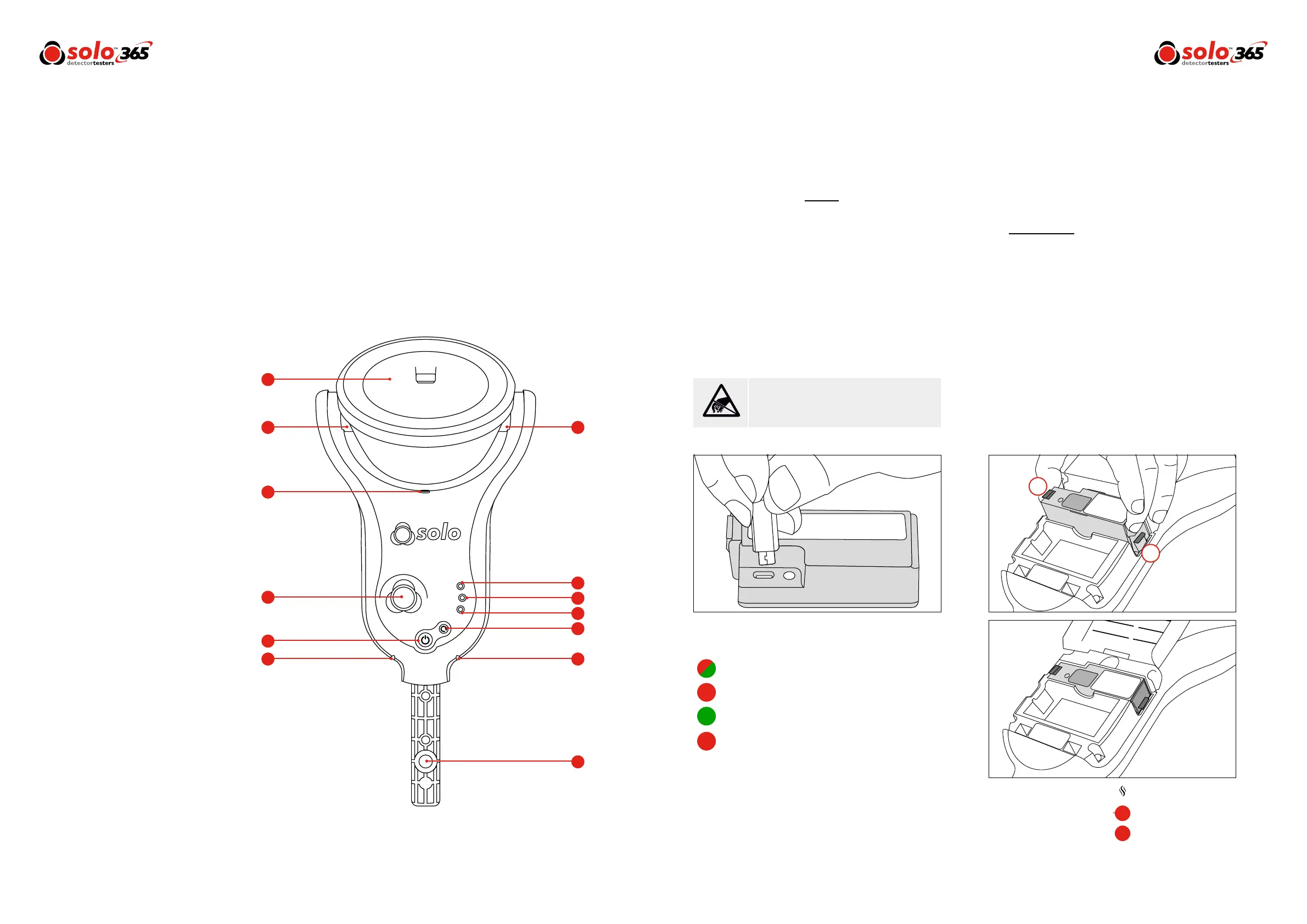
1. Clear cup
2. Smoke outlet
3. Proximity sensor
4. Automatic LED torch
5. Air inlet
6. Power button
7. Status indicator LEDs
8. Locking button
9. Function button
10. Generator status LED
11. Cartridge status LED
12. Battery status LED
Design Features
8
www.solo-tester.com
5
1
2 3
4
6
9
12
11
10
77
8
3.1 Charging the Battery
The battery is charged by connecting the battery pack to
the powered USB socket using the supplied mains adaptor.
Do not charge the battery while it is in place in the unit.
Ensure the battery is fully charged before use.
Preparation
For First Use
3
Prior to rst use:
Check contents provided. Do not charge the battery
while it is tted in the unit. Take care during installation of
the product components not to touch exposed electrical
contacts. Ensure that all components are securely tted.
When replacing consumables, ensure that the unit is
switched off before opening back cover.
3.2 Installing the Generator
• Open the back cover
• Remove protective packaging of generator.
Do not touch exposed electrical contacts.
• Insert generator rmly into recess, engaging clips 1
and 2 (see Fig.1).
• Once the generator is inserted do not remove it until
indicated that a replacement is necessary.
• When replacing a generator, any dust or debris within
the Solo 365 housing can be removed using an air
duster. Any condensation can be removed by wiping
with a lint-free cloth
• Empty generators may be returned to the
manufacturer via the reseller for environmentally
friendly disposal to comply with WEEE (Waste
Electrical & Electronic Equipment) Regulations
Read the cautions on Lithium Ion rechargeable
batteries before use (see Page 2).
Warning
9
www.solo-tester.com
Battery LED:
Flashing Red/Green: Detecting level of charge
Solid Red: Charging
Solid Green: Fully charged
Flashing Red: Fault
|
|
|
|
|
|
|
|
|
|
|
|
|
|
|
|
|
|
|
|
|
|
|
|
|
|
|
|
|
|
Figure 1
2
1
Generator
Flashing Red: Consumable low
Solid Red: Consumable empty
|
|
|
|
|
|
|
|
|
|


 To Next Page