Basic Tracking and Recording
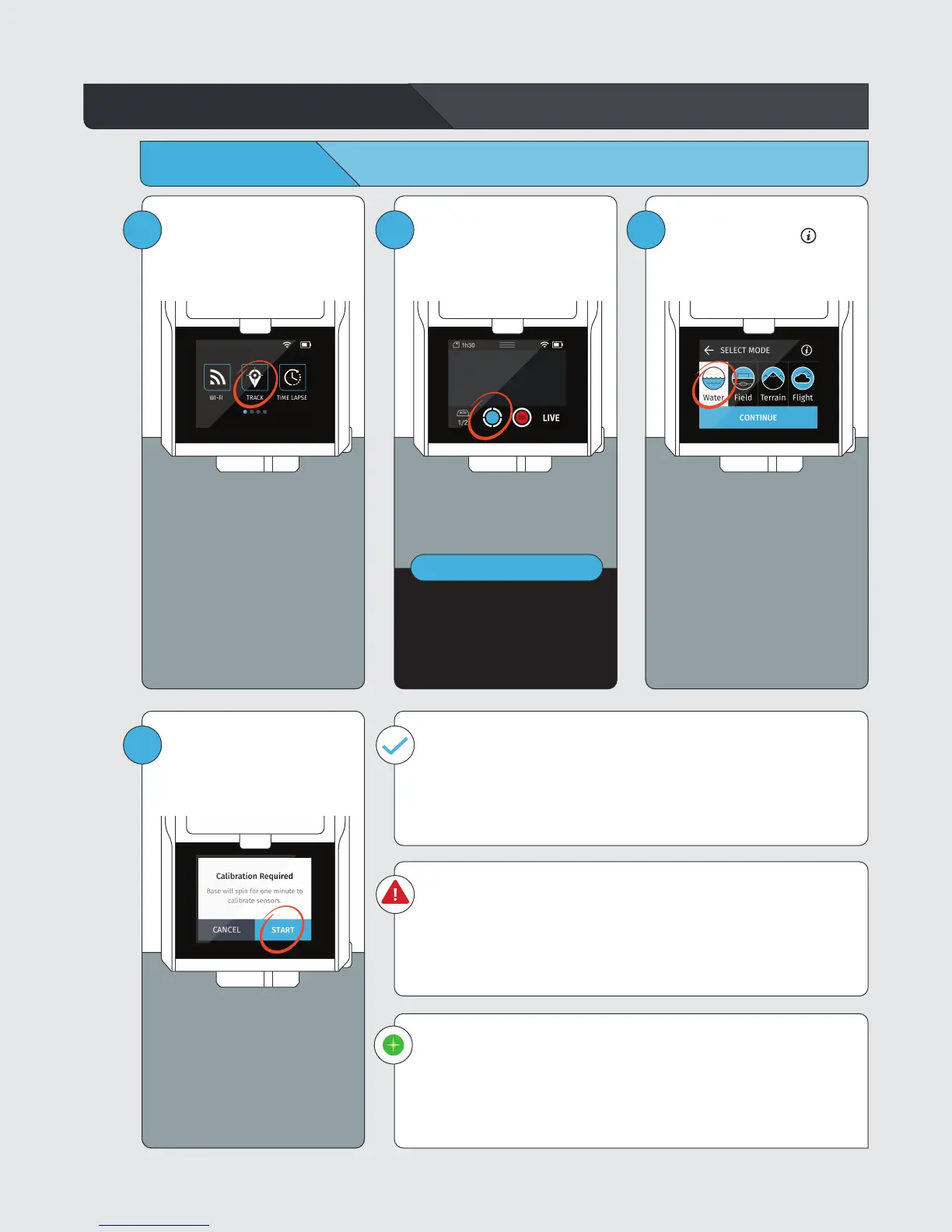
Begin Tracking
1
Within the HOME SCREEN, tap
TRACK to enter the Track App.
2
IMPORTANT
If no Tags are selected, go to the
Tag Manager.
See section: Select Tags
Tap the TRACK button.
3
Select TRACK, then choose
TRACK MODE. Tap the to
learn more about each mode.
4
Press START.
The Base will spin and tilt for
auto calibration.
Calibration Successful
Once calibration is successful, your Base will automatically begin
tracking the selected Tag(s).
• Camera viewfinder appears on the screen
• The LED at the front of the BASE blinks green
Calibration Failed
Calibration may fail due to poor GPS signal or local magnetic interference.
In this case, follow the on-screen instructions.
Please be sure to set up your Base in a location with a clear view of the sky and
away from sources of magnetic interference.
Green Indicator LED States
LED is highly directional & changes brightness with distance.
If you can see it, the Base is pointing at you and you are within range.
• Slow blinking: Actively tracking.
• Rapid Blinking: Problem detected. Return to Base and follow onscreen
instructions.



 To Next Page