soulution
nature of sound
Page 8
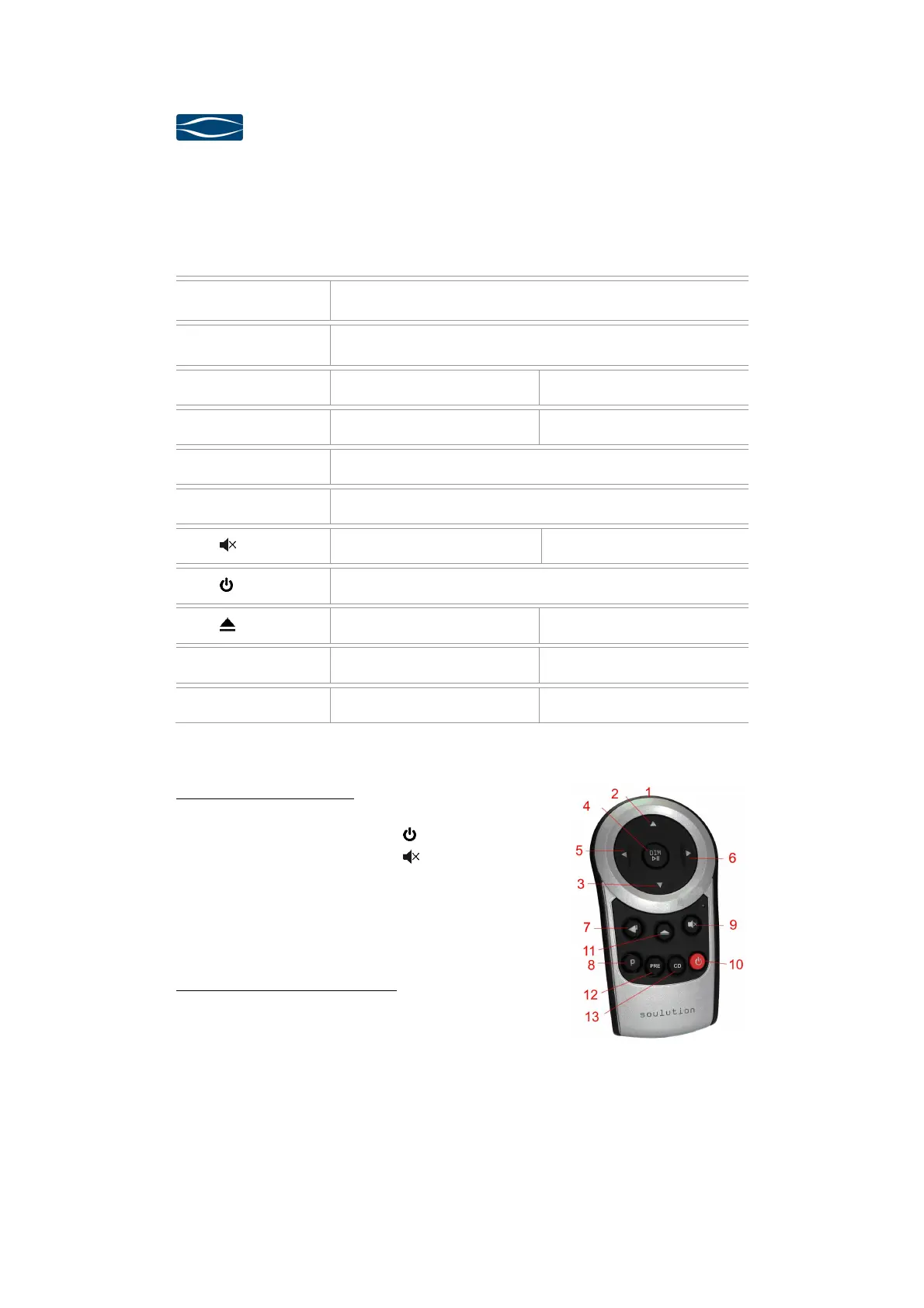
6 Remote control
(1) IR-transmitter Operation until 5m distance and angel of ±45°.
(2,3) p q Volume +/-
(4) DIM /4; Volume-Dim Play/Pause
(5/6) t u Select +/- Next / Previous track
(7) 8 Enter Function for Program-Mode
(8) P (De)activates Program-Mode
(9) Mute -
(10) ON / OFF
(11) - Open/Close
(12) PRE - Activates PRE-Mode
(13) CD Activates CD-Mode -
Change of Remote Ctrl ID:
Press the respective buttons for approx. 5 seconds.
ð
Pre 1: t (6), u (5),
(10)
ð
Pre 2: t (6), u (5), (9)
ð
Phono t (6), u (5), 8 (7)
ð
DAC t (6), u (5), P (8)
Exchange of batteries (2 x AAA):
ð
Open the battery tray on the rear side.
ð
Insert the batteries into the tray as indicated.
ð
Ensure correct polarity of the batteries.
ð
Close the tray with corresponding screw.
ð
Dispose the exhausted batteries



 To Next Page