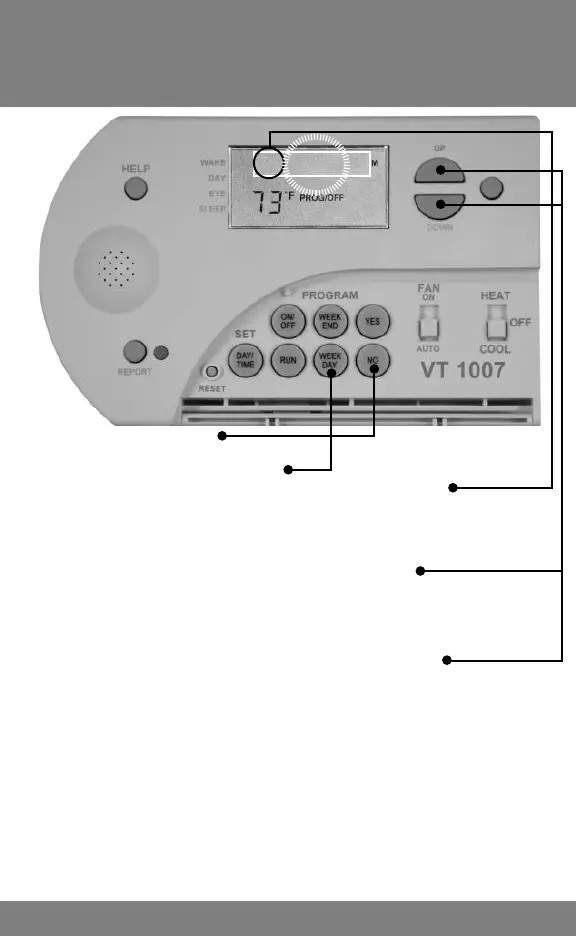
1. Press and HOLD NO, then
2. Press and HOLD WEEK DAY until SET POINT
TEMPERATURE displays FP (Filter Period). The clock
display will begin fl ashing 01 (1 Month).
3. Press UP or DOWN to change fi lter months
4. Press RUN to advance to SP (Service Period). The clock
display will begin fl ashing 06 (6 months)
5. Press UP or DOWN to change service months.
6. Press RUN to advance to ULP (UV Light Period). The clock
display will begin fl ashing 00 (0 or zero months)
7. Press UP to set UV Light months.
8. Press RUN to fi nish
Tip: Count number of months to next Filter Check,
System Service CFS or UV Light CFS and enter that
number.
Adjusting Filter, Service
and UV Light Period (Months)
10
FH 04 00



 To Next Page