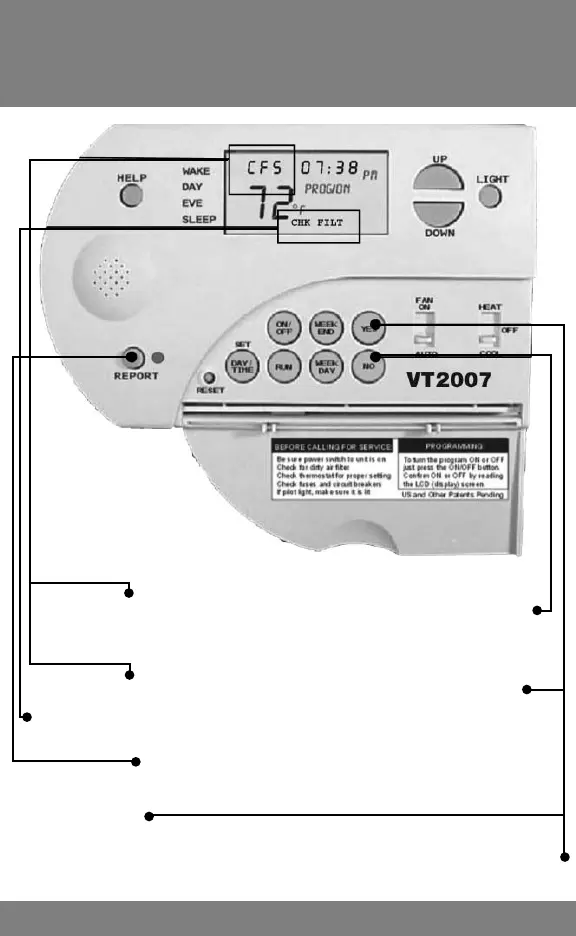
Clearing and Resetting Period (or Hours)
for CFS (for service), CFS (for UV Light)
and CHK FILT
13
To remove “CFS” for Service Period or Service Hours, Press and HOLD NO
for 6 seconds until “CFS” disappears. Resets Service Period to 0 (zero) months
or Service Hours to 1.
To remove “CFS” for UV Light Period or UV Light Hours, Press and HOLD
YES for 6 seconds until “CFS” disappears. Resets UV Light Period to 0 (zero)
months or UV Light Hours to 1. This also resets Check Filter (see below)
To remove CHK FILT and reset Filter Period to 0 (zero) months or Filter Hours to
1, Press the REPORT key.
To manually reset Filter Period to 0 (zero) months or Filter Hours to 1, Press
and HOLD YES for 6 seconds. This also resets UV Light Period (see above)



 To Next Page