100
CONTENTS
WELCOME 2
1. SAFETY 3
2. NINA TIMER IO REMOTE CONTROL 5
3. USING NINA TIMER IO 16
Control an item of equipment 16
My function 18
Natural Control function 22
Launch a scenario 27
Sunlight Function 28
Alarm function 32
Timer function 34
Create typical days 39
Program the week 57
View programmed actions 60
4. CUSTOMIZING NINA TIMER IO 68
Customize items of equipment 68
Customize groups 72
Customize scenarios 78
Define timer settings 83
Customize remote control 88
5. ADVANCED SETTINGS 94
6. TROUBLESHOOTING 107
7. ABOUT NINA TIMER IO 108
Copyright © 2017 - 2021 SOMFY ACTIVITÉS SA, Société Anonyme. All rights reserved.
First installation of Nina Timer io
Complete installation (1/2)
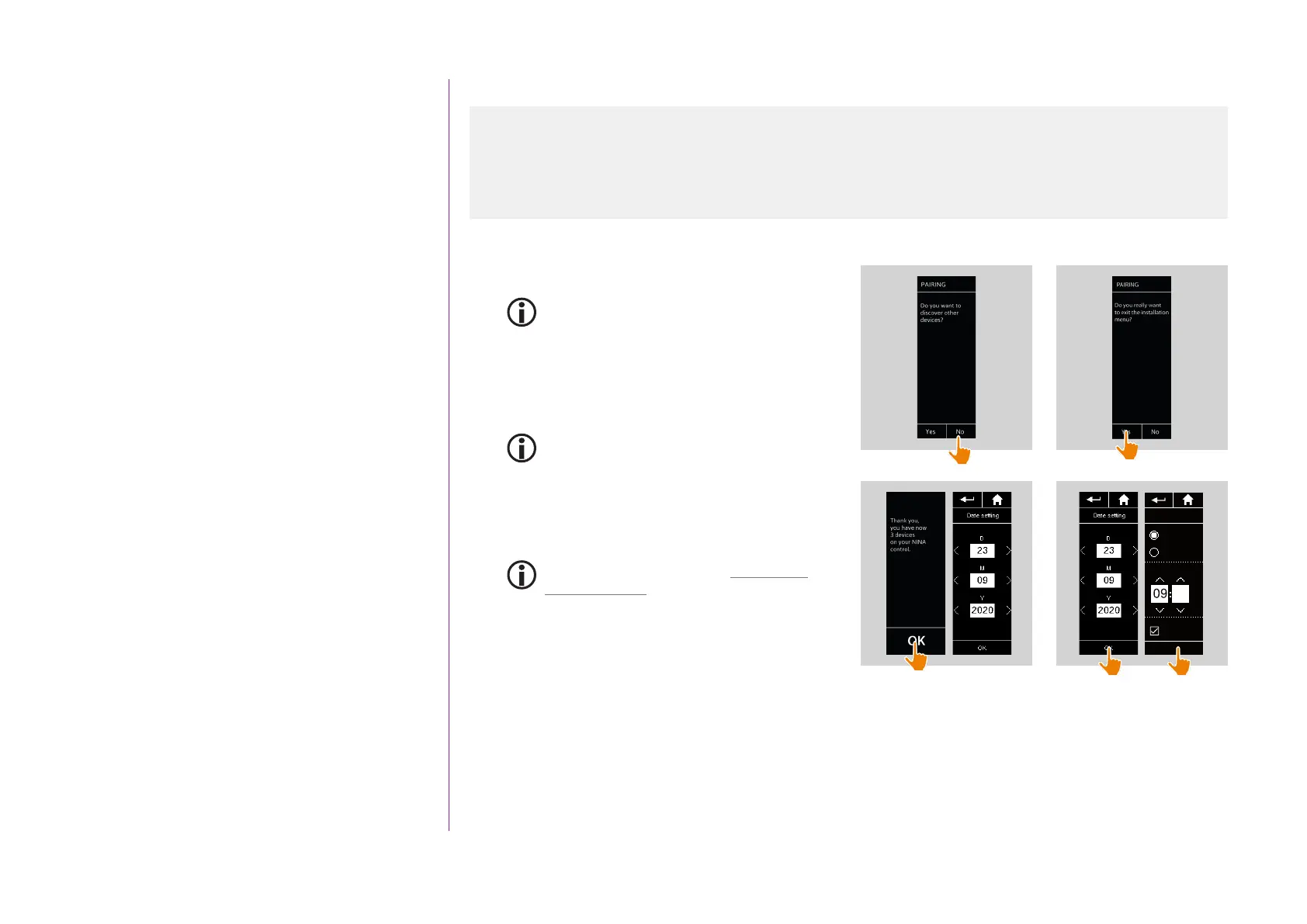
1. Click on No to exit the installation menu.
Click on Yes to return to the pairing page.
2. Confirm this choice by clicking on Yes.
> The number of items of equipment associated
with Nina Timer io is displayed.
Click on No to return to the pairing page.
3. Click on OK to continue the installation process.
4. The date setting screen is displayed.
To define these settings, see Define timer
settings, page 83.
5. Set the date and click on OK. Set the time and
click on OK.
...
Time format
Time adjustment
Winter time
Auto adjust
OK
am
0 - 12 h
0 - 24 h
10
1
2
3
4
Start Nina Timer io 95
Pair equipment 96
Place equipment in groups/rooms 98
Pair sensors 99
Complete installation 100



 To Next Page