P-4 ● P-5 ● P-6 – USER MANUAL
3.9 Phase identification
This function allows the identification of voltage
phases in two distant points of the system.
To activate the function, press button and
hold it for >2 seconds. The display shows
message '123'.
The user has 30 seconds to start the syn-
chronization process. Otherwise the device
will turn off after that time.
Exit the function by pressing button and
holding it for 2 seconds.
In the phasing mode, the HOLD function is
deactivated.
3.9.1 Synchronization
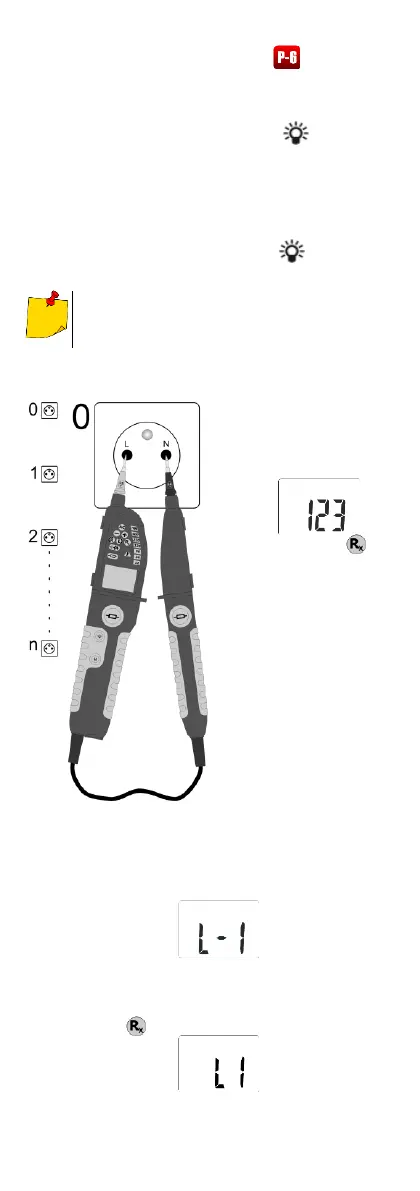
Readiness for syn-
chronization is indi-
cated by displaying
the following:
and pulsating .
Connect the tester
to the tested object
(any connection of
probes is al-
lowed).
Internal generator of
the tester is syn-
chronized with the
phase to which it is
connected (the pe-
riod and phase
must be compliant
with the period and
phase of the signal
at the terminals).
The synchronization process is indicated by display-
ing the following:
The synchronization is indicated by:
repetitive sound signals in case of presence
of voltage,
lighting and displaying the following:


 To Next Page