7
Remote Control Function
Remote Control Function
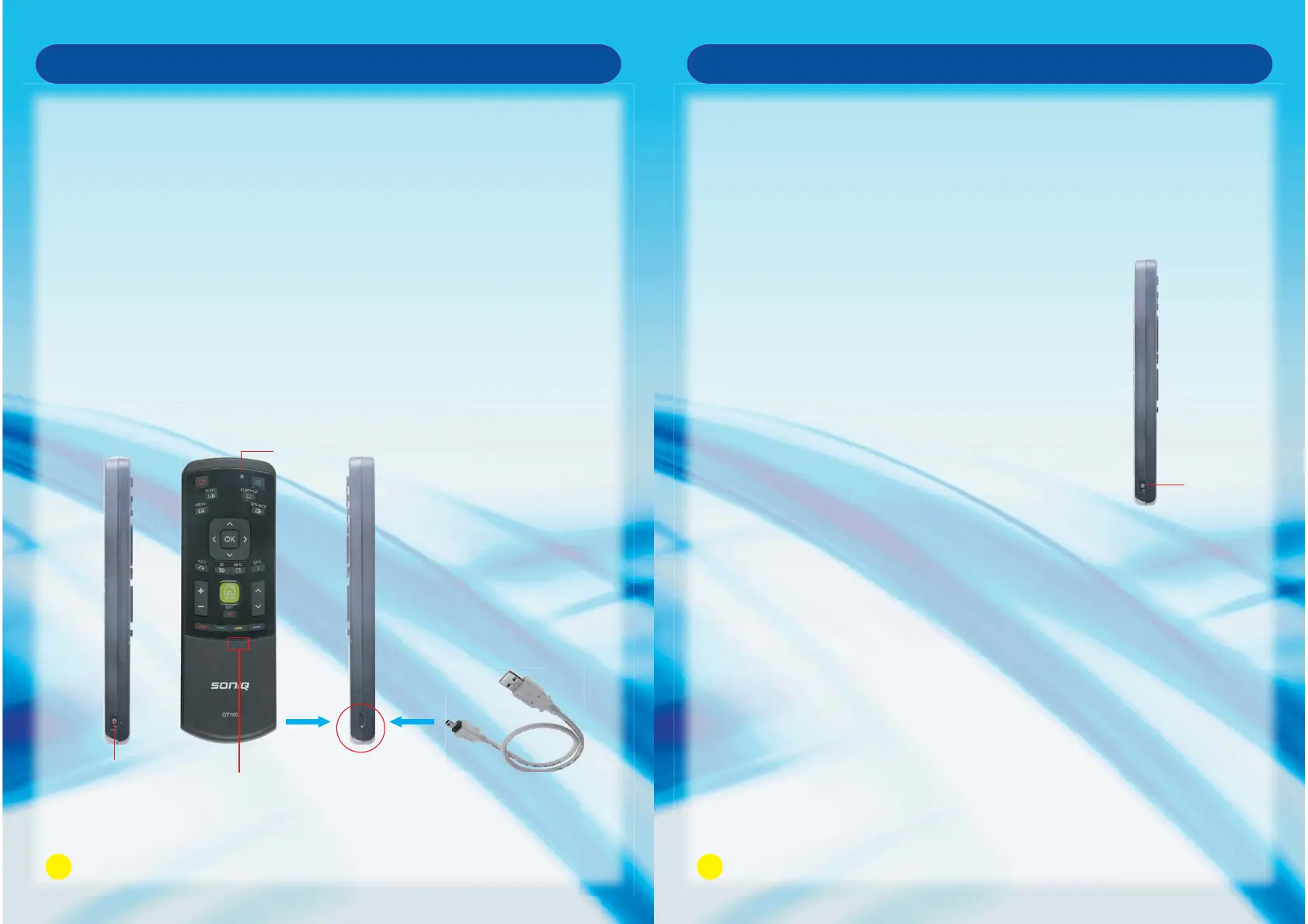
1. Turn the Power Switch ON at the left side of the Remote Control, the indicator light 3 will flash
3 times, meaning you can operate the Remote Control.
2. Press and hold any key to light up indicator light 3, the light will go out when releasing the button.
3. RF Remote Control is supplied with lithium battery. Indicator light 2 flashing means low power,
please charge immediately.
4. Plug in USB cable (supplied with the TV) for charging, then connect to the remote
control/PC/adaptor with the current of 5V/1A. Indicator light 1 lights up when charging is required.
Indicator light 1 will go out when fully charged.
Front Panel of
Remote Control
Right Side of
Remote Control
Left Side of
Remote Control
USB Cable
Indicator 3
Indicator 2
Power
Switch
8
RF Remote Control pairing
Power
Switch
Side View
Remote Control Function
The Remote Control has already been paired for the first time you use it therefore users
do not need to perform this step again under normal conditions, but if it does not work
with battery fully charged or if you have replaced the Remote Control or 2.4G QT166 RF
DONGLE before operating then follow the steps below.
1. Turn on the power at the left side of Remote Control
(pairing will take effect in one minute), and hold the
Remote Control within 1 meter of the unit.
2. Press and hold RF Button for 2 seconds, indicator light 3
will flash and light up together with indicator light 2.
3. Plug 2.4G QT166 RF DONGLE into the USB port on
TV/USB port on the computer.
4. Pairing will complete within 3 minutes, if indicator light 3
and 2 flashes 3 times, that means the device has been
paired successfully. If indicator light lights up all the time
or goes out, that means the pairing failed in which case
please unplug the 2.4G QT166 RF DONGLE, and repeat
the above steps for pairing.
When using the Remote Control, please note:
· Do not strike or drop the Remote.
· Do not expose the Remote Control to liquids and do not
place it in humid environments.
· Do not install or place the Remote Control in direct sunlight,
· the heat may damage the Remote Control.



 To Next Page