17
12
4
35
F1
F8
F7
F6
F5
No.
1
2
3
4
5
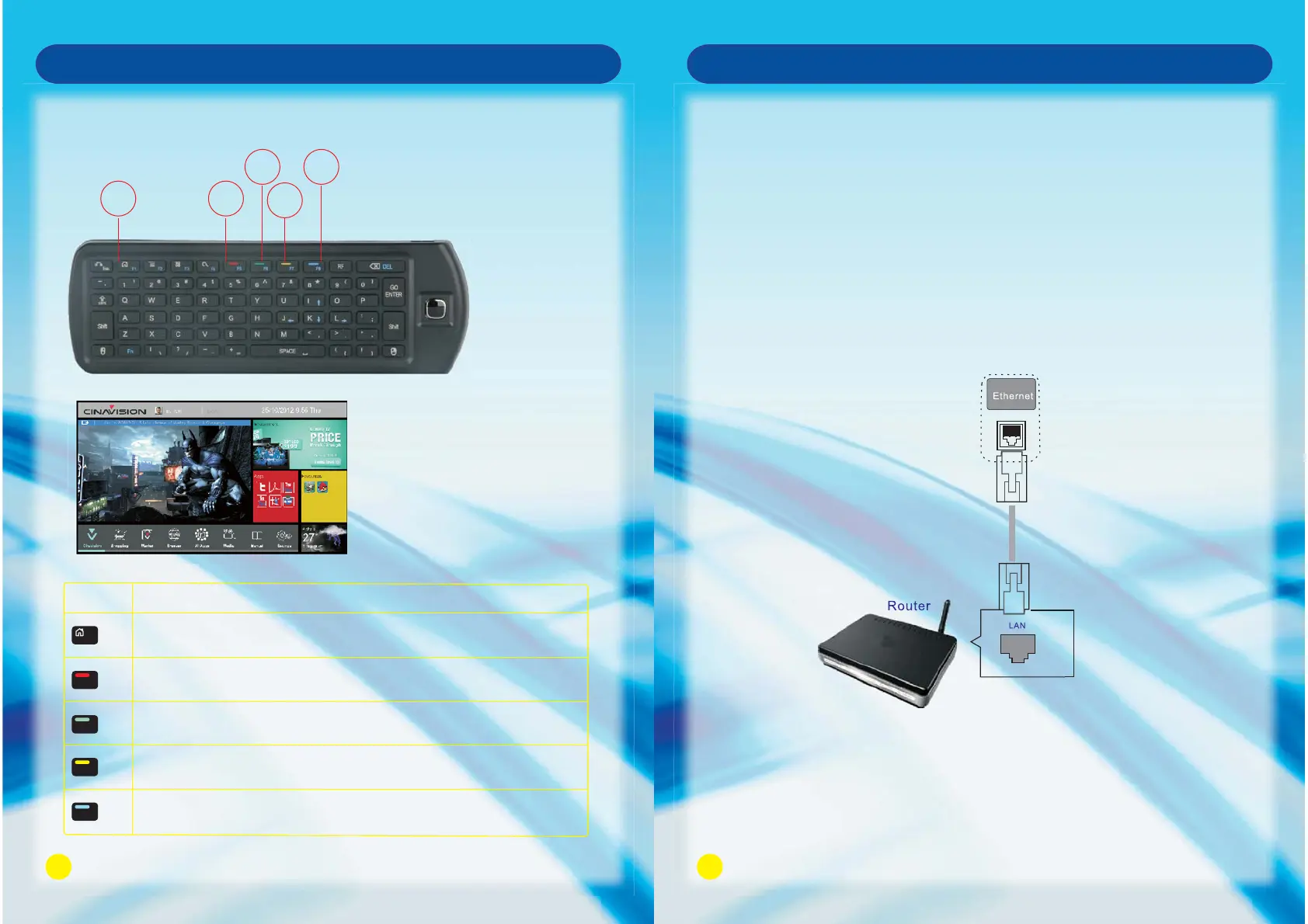
Press HOME Button on the Remote Control to play the current
program in full screen/return to the HOME page.
Cursor positioning key, which will position at bottom on the first
Cinavision.
Press Green key to quick select the recent visited application.
TV default preferences, can not be covered.
Press Yellow Key to view the range of SONIQ Products.
Press Blue Key to visit the website of .SONIQ
Description
Smart TV Function
Hot Key operation at HOME page
18
Smart TV Function
CAUTION
Do not connect a modular phone cable to the LAN port.
Since there are various connection methods, please follow the specifications of your
telecommunication carrier or internet service provider.
Network Connection
Connect the TV to a local area network (LAN) via the LAN port as shown in the following
illustration and set up the network settings.
If wired and wireless networks are both available, wired is the preferred method.
After making a physical connection, a small number of home networks may require the
TV network settings to be adjusted.
For most home networks, the TV will connect automatically without any adjustments.
For detailed information, contact your internet provider or refer to router manual.
Remark: Network speed requirement is very important to this TV. Please keep network
open, if there are any problems with your network connection please contact
your internet provider or refer to router manual.
Connecting to wired network



 To Next Page