13
Connection and Setup
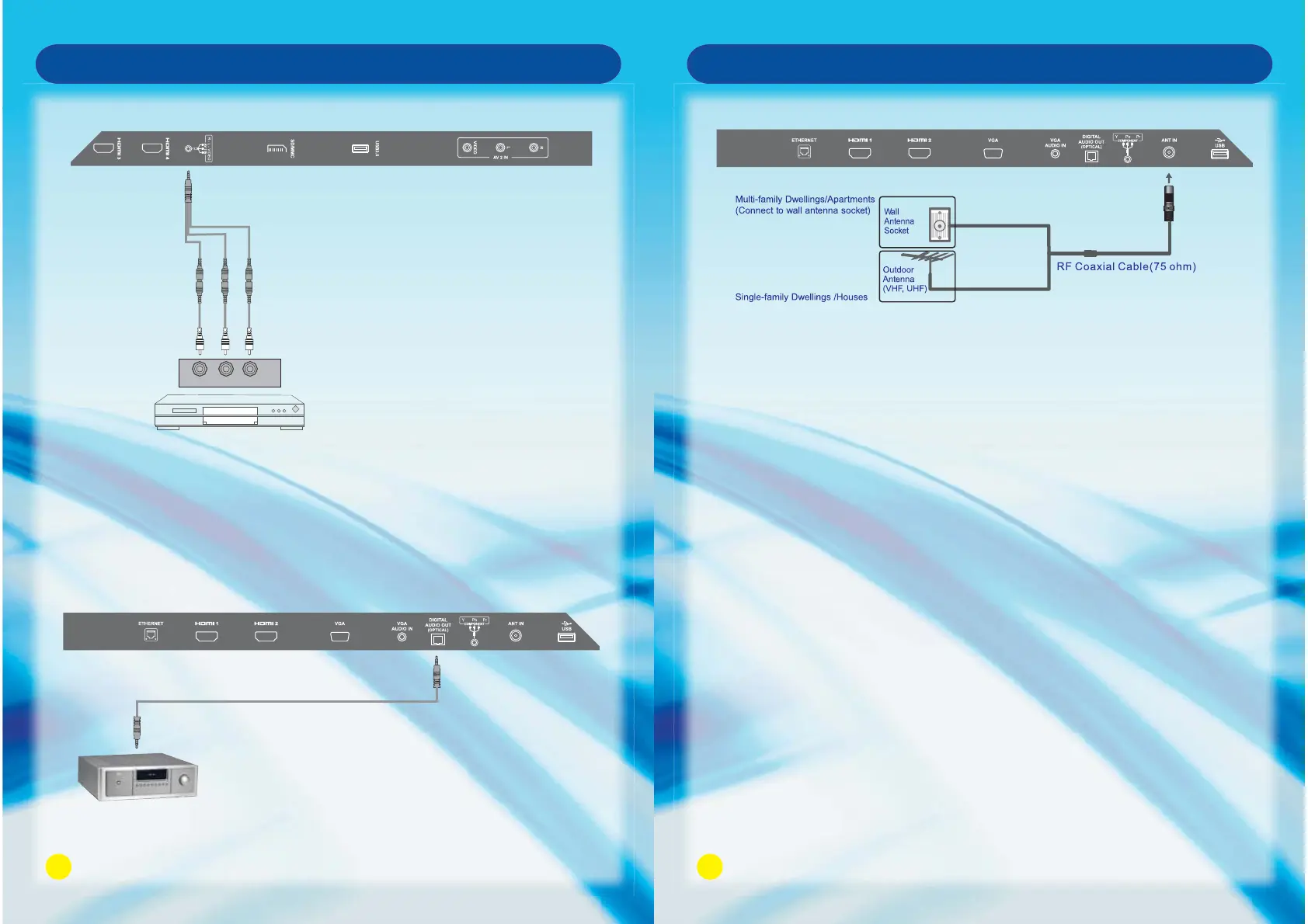
Optical Connection
Cables are not included in package
Optical input
14
ANT IN Connection
Connecting the USB Device
Insert the USB directly to the unit.
1. Please do not turn off the TV or unplug the USB device when the connected
USB storage device is working. When such device is suddenly separated or
unplugged, the stored files or the USB storage device may be damaged.
Connection and Setup
(included)
Yellow
White
Red
Audio (AV) Cable
Back side of DVD player
DVD player
Precautions when using the USB device
1. Please do not turn off the TV or unplug the USB device when the USB is connected.
When such device is suddenly separated or unplugged, the stored files or the USB storage device
may be damaged.
2. Please use only USB storage devices that are formatted as a FAT32 file system, otherwise it may
not be recognized.
3. Every USB port only supply 500mA electric current, if the user’s device requirement is over the
specification, users need to choose to connect to the external power supply, otherwise the device
may not be recognized.
4. If the USB HDD does not have an external power supply, the USB device may not be detected.
So be sure to connect the external power supply.
5. The recommended capacity is 2TB or less for a USB external hard disk and 32GB or less for USB
flash memory.
6. The recognition speed of a USB storage device may depend on each device.
7. Please connect a USB storage device with the cable offered by the device maker.
8. Be sure to back up important files since data stored in a USB memory device may be damaged.
We will not be responsible for any data loss.
9. If your USB memory device has multiple partitions, or if you use a USB multi-card reader, you can
use up to 4 partitions or USB memory devices.
10. If the USB memory device does not work properly, disconnect and reconnect it. How fast a USB
memory device is detected differs from device to device.
11. If the USB is connected in Standby Mode, specific hard disk will automatically be loaded when the
TV is turned on.
12. Any device with more than the recommended capacity may not work properly.



 To Next Page